Overshoot makes an animation pass beyond its target before settling. In CSS cubic Bézier timing, a y-value greater than 1 creates the forward overshoot, while a negative y-value creates anticipation by moving briefly backward. section 11.2.2 section 11.2.1
Tune the effect through the cubic Bézier control points:
- Set y2 above 1 to extend the final approach beyond the target before settling. section 11.2.2
- Set y1 below 0 to add backward motion before the animation proceeds toward its target. section 11.2.2
- Keep x1 and x2 between 0 and 1; they control when acceleration and deceleration occur. section 11.2.1
- Reduce extreme y-values when the motion feels excessive; a smaller overshoot produces a gentler bounce. section 11.4
Bouncing a dialog into view
A dialog can shrink while entering, expand to 1.05 times its normal size, contract slightly, and settle at its original scale. The timing function cubic-bezier(0.7, -0.5, 0.25, 1.5) combines anticipation with overshoot: .attention-grabbing { animation: bounceIn 0.6s cubic-bezier(0.7, -0.5, 0.25, 1.5); } section 11.3.1
Figure 11.12 The cubic Bézier curve defined by cubic-bezier(0.7, -0.5, 0.25, 1.5)
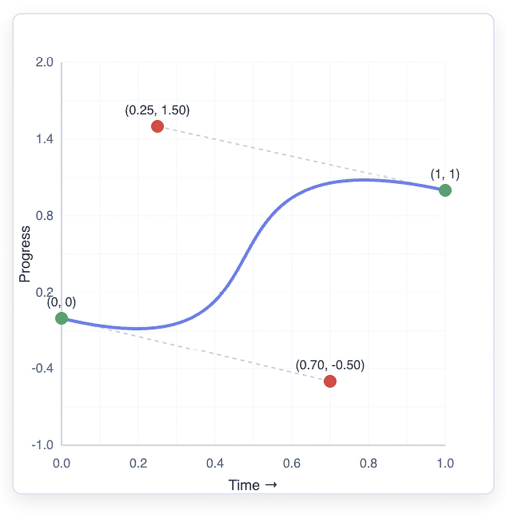
Inspect the curve for cubic-bezier(0.7, -0.5, 0.25, 1.5) and relate its out-of-range y-values to the dialog’s anticipation and overshoot. section 11.3.1
