A page fault is a processor-generated exception raised when a thread accesses a virtual-memory page that is not currently mapped to usable physical memory. The hardware trap transfers control to the operating system, which can allocate a physical page, load contents from a mapped file, or restore an evicted page from swap. section 7.4.4
Demand paging creates mappings lazily. Process startup establishes text, data, BSS, heap, and stack regions without immediately assigning physical pages; first access supplies the trigger. This saves work and memory initially, but makes access latency unpredictable because fault handling may require disk I/O. Memory pressure can later evict anonymous pages to swap and mark them non-present, causing another fault when they are accessed. section 7.4.4
Page faults matter in several common memory-management paths:
- Map a file with mmap(); the operating system pages file data into memory as the application accesses it, avoiding explicit read() and write() calls. section 10.2.5
- Expect readahead to hide some I/O latency, but recognize that unsuitable access patterns or a working set larger than memory can amplify latency. section 10.2.5
- Protect latency-sensitive regions by preallocating virtual memory and pinning pages with mlock() on Linux or VirtualLock() on Windows, reducing eviction-driven faults. section 7.4.4
First access to a virtual page
Suppose a process first touches a virtual page corresponding to an address such as 0x200000. Although the process sees contiguous virtual addresses, the operating system may assign a physical page at an unrelated location, such as the range 0x200000–0x201000 in physical memory. The first access faults, the operating system establishes the mapping, and later accesses can use it unless the page is evicted. section 7.4.4
Figure 7.5 A page table is a data structure the CPU uses to translate virtual memory addresses to physical addresses. A page in virtual memory does not always have a counterpart in physical memory. Instead, the OS can store a page on the disk, for example, and lazily move it to physical memory when it’s accessed.
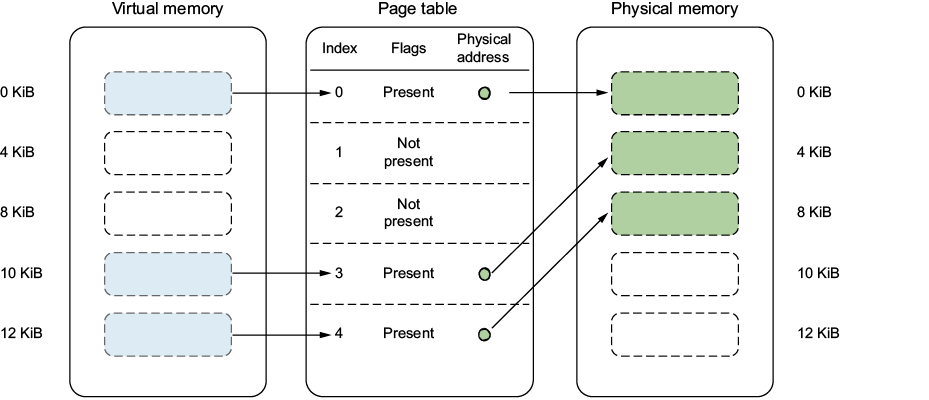
Use the page-table figure to trace how a virtual page can lack a physical counterpart, remain on disk, and move into memory only after access. section 7.4.4

