The pandas datetime accessor turns a datetime-like Series into a collection of useful calendar and clock features. After parsing dates, use expressions such as `s.dt.month`, `s.dt.month_name`, `s.dt.hour`, `s.dt.day_of_week`, and `s.dt.is_leap_year` without creating separate columns first. section 10.0
Group taxi tips by day and hour
Parse the pickup column, then group directly on accessor results: `df.groupby(df['tpep_pickup_datetime'].dt.day_of_week)['tip_percentage'].mean().sort_values(ascending=False)`. To compare hours, replace `day_of_week` with `hour`; to compare months, use `month`. The weekday values use Monday as 0 and Sunday as 6. section 10.14
Use the accessor as part of a broader datetime workflow:
- Parse CSV date columns with `pd.read_csv(..., parse_dates=[...])` before applying `.dt`. section 10.0
- Extract fields such as month, month name, hour, weekday, and leap-year status. section 10.0
- Use extracted fields as grouping keys, then combine them with aggregation and sorting. section 10.14
- Set a datetime column as the index when partial-date selection or resampling is clearer than column-based queries. section 10.10
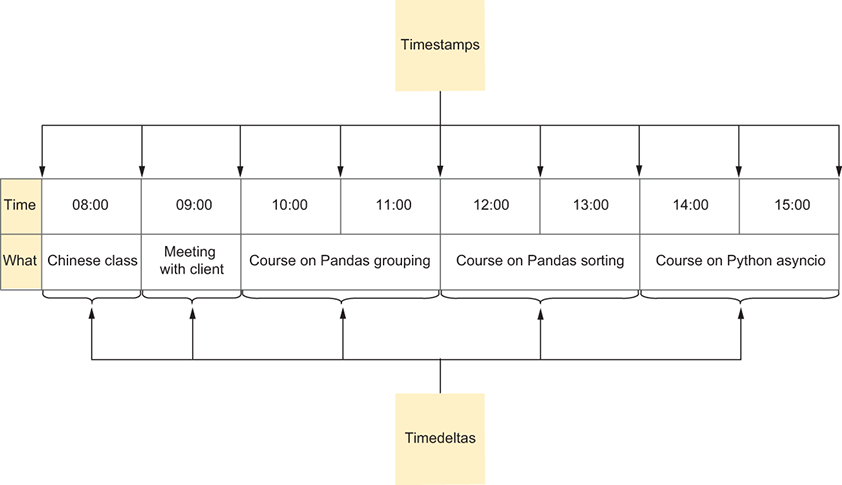
A schedule illustration helps connect extracted datetime parts with timestamps and timedeltas in practical time-based data. section 10.0
