A pandas index is the label layer for a Series or DataFrame axis. Think of it as the names on file folders: values remain inside, while labels tell pandas how to find, compare, and organize them. A DataFrame has one row index shared by all of its columns, and each column is itself a Series. section 1.0 section 2.0
Indexes are more than row numbers. They support label-based retrieval with `.loc`, while `.iloc` retrieves by position. A label-based slice can express the analytical question directly: retrieve exam results from September through January, rather than calculate positions first. section 1.3 section 4.2
Label test scores by month
Assign month names while creating a Series, then use those labels to calculate a period’s mean: ```python months = 'Sep Oct Nov Dec Jan Feb Mar Apr May Jun'.split() s = Series(g.integers(70, 101, 10), index=months) first_half_average = s.loc['Sep':'Jan'].mean() ``` The index makes the result easier to read and lets the slice follow the calendar rather than raw offsets. Positional selection, such as `s.iloc[:5]`, remains useful when position is the real criterion. section 1.3
An index does not have to be unique. Repeated labels are useful when several observations belong to the same category, such as four Monday temperature readings. Selecting a unique label normally returns one value; selecting a repeated label returns the matching subset. section 1.18 section 1.19
Retrieve every Monday
Build a 28-day temperature Series with weekday labels repeated four times, then select all Monday observations at once: ```python days = 'Sun Mon Tue Wed Thu Fri Sat'.split() s = Series(g.normal(20, 5, 28), index=days * 4).round() mondays = s.loc['Mon'] mean_monday_temperature = mondays.mean() ``` The repeated `Mon` labels are intentional: they turn one label lookup into a collection of related readings. section 1.19
Indexes also control alignment in vectorized operations. When two Series are added, pandas matches values by label, not by their displayed order. The result receives the aligned index. By contrast, adding a scalar broadcasts that scalar across every value while preserving the Series index. section 1.7 section 1.9
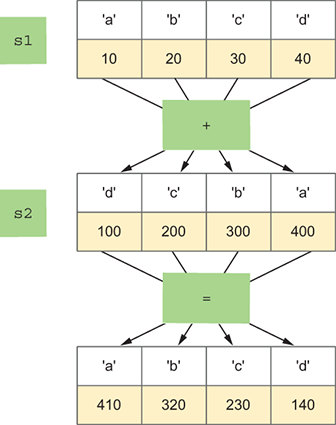
Compare the reversed labels before and after addition: matching labels, rather than matching positions, determine which values are combined. section 1.7
Align labels before adding
Even though the labels appear in opposite orders, each label is paired with its counterpart: ```python s1 = Series([10, 20, 30, 40], index=list('abcd')) s2 = Series([100, 200, 300, 400], index=list('dcba')) s1 + s2 ``` The value at `a` is `10 + 400`, not `10 + 100`. Treat label order and positional order as separate ideas when checking a calculation. section 1.7
For DataFrames, choose an index that matches the questions you expect to ask. If repeated queries concern issue dates, moving `Issue Date` into the index makes date lookups shorter. `set_index` returns a new DataFrame; `reset_index` restores the current index as a column so another field can become the index. section 4.2
Index parking tickets by issue date
Set the date as the row identity, then retrieve a date and a single column with `.loc`: ```python df = df.set_index('Issue Date') df.loc['01/02/2020 12:00:00 AM', 'Vehicle Make'] ``` Follow the lookup with `value_counts()` to identify common makes for that date. If vehicle color becomes the next analytical focus, reset the date index and set `Vehicle Color` as the replacement. section 4.2
Indexes frequently become the output labels of analysis. A `groupby` aggregation returns a Series whose index holds the unique group values, while the values hold the aggregations. That distinction explains why `sort_values()` orders aggregate results and `sort_index()` orders their group labels. section 6.6 section 6.10
Indexes can also support joins and reshaping. Setting identifier columns as indexes prepares DataFrames for `join`, and indexes can represent dimensions chosen for comparison in pivot-oriented reshaping. Use them as deliberate analytical structure, not merely as an automatically generated row counter. section 6.10 section 4.17
