An online shop’s price-change topic may start small, then need more consumers as traffic grows. Its partition count is the number of partitions in the topic. Set it with `--partitions` when creating the topic; `PartitionCount` in `kafka-topics.sh --describe` shows the current value. Partition count is separate from replication factor: partitions divide work, while replication stores redundant copies. section 3.1.1 section 3.1.2
Create and inspect a two-partition topic
Run `kafka-topics.sh --create --topic products.prices.changelog --replication-factor 2 --partitions 2 --bootstrap-server localhost:9092`. Then run `kafka-topics.sh --describe --topic products.prices.changelog --bootstrap-server localhost:9092`. The result reports `PartitionCount: 2` and shows one detail line for each partition, numbered 0 and 1. section 3.1.2
More partitions let producers distribute writes and brokers share load. They also let members of a consumer group process different partitions concurrently: Kafka assigns whole partitions, not arbitrary messages, to preserve order within each partition. There is no ordering guarantee across partitions. If a slow downstream data store is the bottleneck, adding partitions or consumers may bring little benefit. section 6.1.1 section 6.1.2
Choose a count with both scaling and operating costs in mind:
- A practical starting point is 12 partitions, with counts easily divisible among planned consumers and, ideally, brokers. For higher throughput needs, assess whether more concurrent consumers are required, then consider doubling the count. section 6.1.2
- Avoid adding partitions without a reason. Each consumes client and cluster resources; excessive counts increase monitoring complexity and can lengthen recovery after broker failures. section 6.1.2
Changing the count deserves particular care. Kafka can increase a topic’s partitions, not decrease them. New partitions start empty, so data distribution is initially uneven. More importantly, keyed messages are assigned using the key’s hash modulo the partition count: after an increase, later messages with a key may land in a different partition from older ones. If preserving their order is essential, plan a new topic and migration instead; if keys and ordering do not matter, an increase is less disruptive. section 6.1.3
Figure 6.3 After changing the number of partitions, the partition number for a particular message key usually changes. In this example, messages with the key circle are now produced to partition 2 instead of partition 1, and messages with the key square are now produced to partition 1 instead of partition 0.
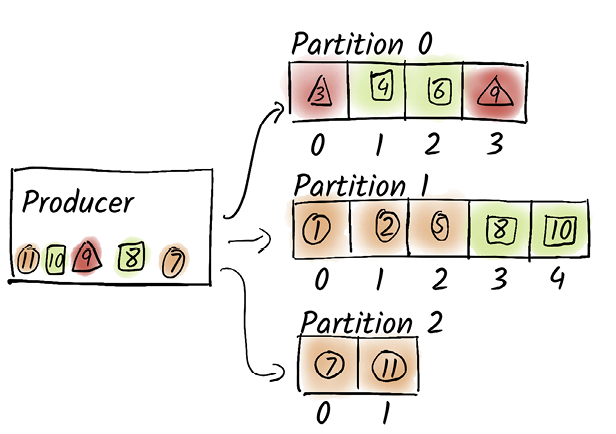
Follow the same keys before and after a partition-count increase to see why later messages can move to different partitions. section 6.1.3

