A partitioning key is the column whose value determines where a row goes when a table is horizontally partitioned. The rows remain part of one logical table, even though they are stored in separate partitions. In some distributed SQL databases, defining the key is the application developer’s main partitioning task; the database handles the split. section 5.2.1
Partition users by location
Consider a Users table with ID, Username, and Location columns. Using Location as the partitioning key places two New York users in one partition, one Cape Town user in another, and one Sydney user in a third. A query against the partitioned table must first identify which partitions it affects. section 5.2.1
Figure 5.1 Horizontally partitioning a database table. On the left, you can see the full logical table with four rows. On the right side, you can see three horizontal partitions.
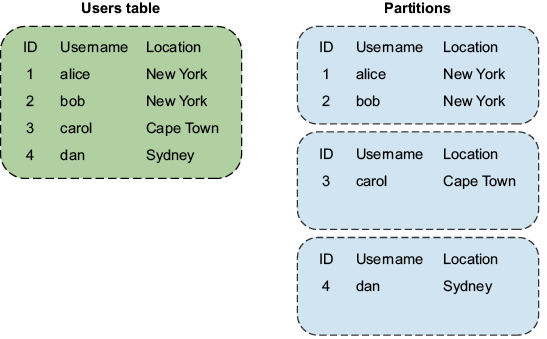
Compare the four-row logical table with its three location-based partitions to see how one key value groups complete rows. section 5.2.1
Key choice affects balance. Suppose user ZIP codes are the key in a key-range scheme. If many users live in a few areas, some ranges may hold far more keys than others, creating hot partitions. Changing the key or switching to key-hash partitioning can improve distribution. Equal key counts are not sufficient, though: partitions can still differ greatly in size when their values differ, as with large images in an object store. Choose with the data distribution in mind; correcting a poor scheme may require rebalancing every partition on a live system. section 5.5.1









