PasswordAuthenticator is ScyllaDB’s strict authentication provider: every connection must supply a valid username and password. Invalid or missing credentials prevent connection. section 9.1.4
Use it with these operational considerations:
- Enable it in scylla.yaml by setting authenticator to PasswordAuthenticator; configure CassandraAuthorizer separately when access permissions are also required. section 10.6.1
- Increase the system_auth keyspace replication factor to the total number of cluster nodes, reducing the risk that node unavailability blocks login. section 9.1.4
- Treat the change as disruptive: applications without valid passwords immediately stop connecting when strict authentication is enabled. section 9.1.4
Enable authentication in a Docker cluster
Copy scylla.yaml out of the container, set authenticator: PasswordAuthenticator, copy the file back, then drain connections and restart Scylla. Startup creates a default superuser record for subsequent role management. section 10.6.1
Figure 9.3 In your Scylla cluster are three authenticators: one to allow everything, one that allows only valid users with correct credentials, and one to facilitate transitioning to authentication without downtime.
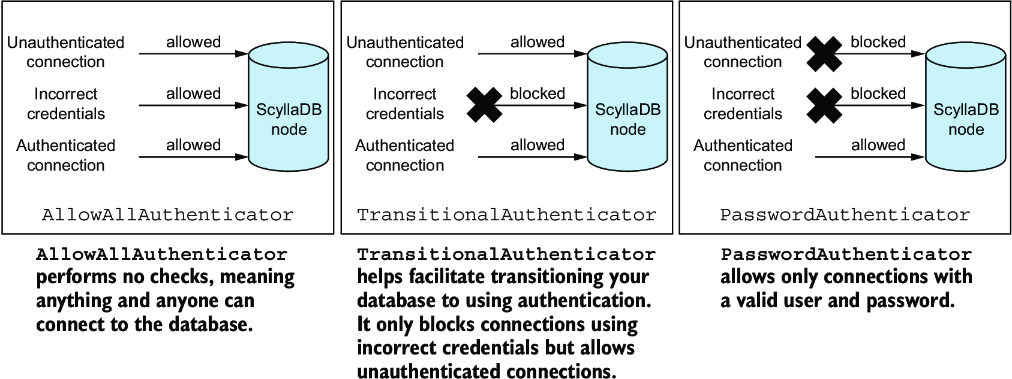
Compare strict password authentication with AllowAllAuthenticator and TransitionalAuthenticator, which supports a gradual migration. section 9.1.4
