PerfView is a Windows performance-analysis tool for inspecting runtime profiles and reducing noisy call trees. It is especially useful when comparing profiles to identify performance regressions. section 10.3.2 section 10.3.3
Its workflow centers on grouping, folding, and filtering stack data. Grouping combines related frames, folding hides a matched frame while retaining lower frames, and filtering removes a frame together with everything below it. section 10.3.3
Read profile costs carefully:
- Exclusive cost measures CPU time spent executing a method’s own instructions. section 10.3.3
- Inclusive cost adds a method’s exclusive cost to the inclusive costs of methods it calls. section 10.3.3
- Use grouping and folding to remove BenchmarkDotNet and workload scaffolding from the call tree without discarding the work beneath it. section 10.3.3
Reducing benchmark noise
Group frames containing "BenchmarkDotNet" and fold frames beginning with "Activity Workload". The resulting call tree emphasizes the profiled operation instead of benchmark steps and workload-specific wrappers. section 10.3.3
Figure 10.3 PerfView has powerful grouping and folding capabilities that can reduce noise in profiles by grouping or folding frames that you don’t care about.
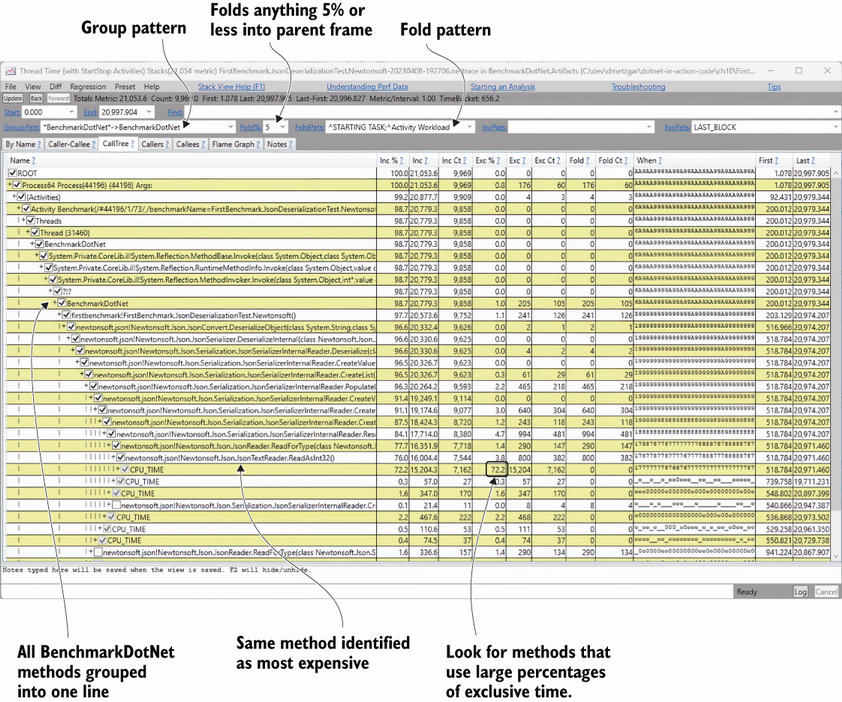
A visual example of PerfView grouping and folding frames to reduce profile noise. section 10.3.3
