A permissions model defines which actions and resource accesses are allowed, require approval, or are blocked. For an AI assistant, it helps limit what the assistant can inspect or change while it works on a task. section 3.2 section 3.5
In Cowork, folder access is granted per task. Disk-access tools check the approved folder list and do not read files from unapproved folders. Choose a specific folder for the task rather than a broad one: the assistant can explore what is inside any folder you grant. section 3.2
Read and write in a folder
Ask Claude, “How many files do I have in my Downloads folder?” and grant access when prompted. Then ask it to create summary.md there with the file count and storage used. Claude can reuse the folder approval within the task; macOS may also ask for permission to write. A new task asks for folder access again. section 3.2
Connectors add action-by-action control for external systems. An action can be allowed always, require confirmation, or be blocked. Set actions that change data to require approval when you want to review them before they run. section 3.5
Figure 3.7 The MCP server is the adapter between Claude’s tool list and the source system. It holds the credentials and exposes a small set of permissioned actions.
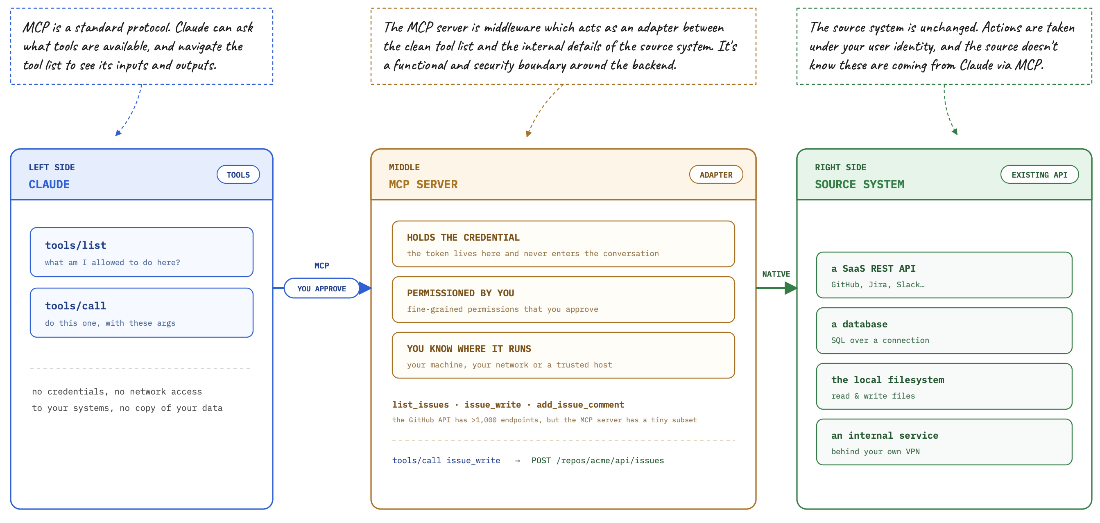
The adapter connects Claude’s available tools to a source system and exposes permissioned actions. section 3.5
Connector authentication is separate from action approval: you sign in to the external system, and the connection runs as you using an OAuth token. It can see what you can see, and you can revoke the token from the issuing system. Review both the access granted and the actions permitted. section 3.5
