A persistent testing environment keeps infrastructure resources available across integration-test executions. Use it when a configuration has many dependencies or takes substantial time to create; smaller, simpler configurations can usually be created, tested, and deleted each time. section 6.4.3
Choose the testing lifecycle according to module size, dependency complexity, and update behavior:
- Test low-level modules such as networks or DNS in place when updates are more realistic than repeated creation and deletion. section 6.4.3
- Keep mid-level modules such as workload orchestrators persistent or temporary according to their size and resource requirements. section 6.4.3
- Create and delete high-level modules such as application deployments or SaaS resources when each execution remains practical. section 6.4.3
- Keep modules small and limit their resources because persistent environments still make integration tests slow when resources require creation or updates. section 6.4.3
A delivery pipeline can run unit and integration tests against the persistent environment before manual approval and production deployment. This exposes conflicts between infrastructure changes and more closely reflects production behavior, but adds ongoing cost. section 7.2.2
Firewall rule delivery
A pipeline tests a firewall rule change in the persistent environment. If the change fails, delivery stops before production, the change is reverted, and a fix can be implemented while other changes proceed. section 7.2.2
Figure 6.12 Your integration test should create and delete resources based on module or configuration type and dependencies.
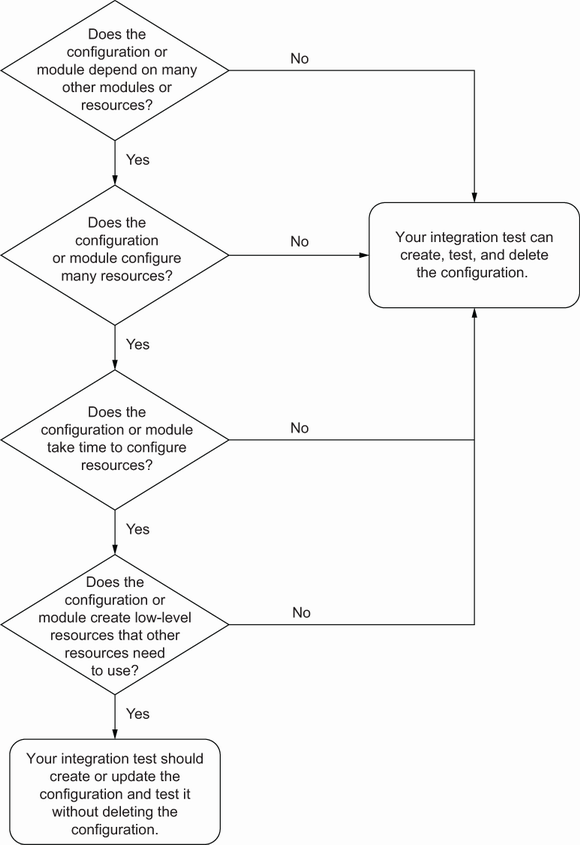
Use the decision tree to select create-and-delete or persistent testing according to module type and dependencies. section 6.4.3
