Physics simulation approximates physical behavior with calculations that update visual objects over time. On an HTML canvas, JavaScript turns those calculations into motion, geometry, and pixel-level feedback. section 14.0
A practical simulation can begin with two velocity components. Gravity changes vertical velocity, while drag gradually reduces horizontal velocity. Position advances by adding velocity, producing a trajectory that feels more natural than fixed animation steps. section 14.2.3
A canvas particle simulation typically combines these pieces:
- Create particles with initial position, random velocity, dimensions, rotation, rotation speed, and color. section 14.2.3
- Update each particle by applying gravity and drag, then adding velocity to its position. section 14.2.3
- Draw each particle by translating and rotating the canvas context before filling a rectangle. section 14.2.3
- Remove particles after they leave the canvas bounds so the animation remains finite. section 14.2.3
Celebratory confetti
After a user completes a workflow, a canvas can emit randomly varied rectangles. Each piece launches upward with a random horizontal direction, falls as gravity increases vy, slows horizontally through drag, rotates during flight, and disappears beyond the viewport. section 14.2.3
Figure 14.6 A celebratory shower of confetti appears upon completion of the task. Each piece of confetti is a canvas rectangle given an initial random velocity, height, width, rotation, and color.
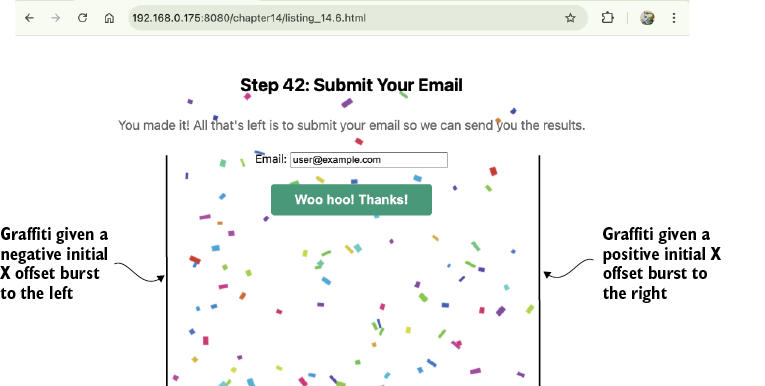
Use the figure to inspect the intended visual result: a brief confetti shower whose varied trajectories and shapes create a celebratory effect. section 14.2.3
Listing 14.6a Creating a shower of confetti (part 1)
HTML:
<canvas id="confettiCanvas"></canvas>
<div id="ui">
    <h2>Step 42: Submit Your Email</h2>
    <div class="info">You made it! All that's left is to submit
        your email so we can send you the results.</div>
    <label for="email">Email:
        <input id="email" type="email" size="30" value="user@example.com">
    </label>
    <button id="submitBtn">Complete the Task</button>
</div>

JavaScript:
function createConfettiCelebration(canvas) {  #1
    const ctx = canvas.getContext('2d');
    const confettiPieces = [];  #2
    const gravity = 0.15;  #3
    const drag = 0.005;#4
    let isAnimating = false;

    function createConfetti(x, y) {  #5
        return {
            x: x,
            y: y,
            vx: Math.random() * 7 - 3.5,  #6
            vy: Math.random() * -7 - 5,  #7
            width: Math.random() * 10 + 5,
            height: Math.random() * 5 + 3,
            rotation: Math.random() * Math.PI * 2,  #8
            rotationSpeed: Math.random()  #8
                           ➥    * 0.2 - 0.1,   #8
            color: `hsl(${Math.random() * 360}, 70%, 50%)`,
        };
    }

    function burst(centerX, centerY, count = 100) {  #9
        for (let i = 0; i < count; i++) {
            const offsetX = Math.random() * 60 - 30;    #10
            const offsetY = Math.random() * 60 - 30;     #10
            confettiPieces.push(createConfetti(
                centerX + offsetX,
                centerY + offsetY
            ));
        }
    }
Use the listing to trace particle creation, including gravity, drag, random velocities, and varied visual properties. section 14.2.3
Listing 14.6b Creating a shower of confetti (part 2)
    function updateConfetti(confetti) {
        confetti.vy += gravity;  #1
        confetti.vx *= (1 - drag);  #2

        confetti.x += confetti.vx;  #3
        confetti.y += confetti.vy;   #3

        confetti.rotation +=
        ➥    confetti.rotationSpeed;  #4

        return (  #5
            confetti.y < canvas.height + 20 &&   #5
            confetti.x > -20 &&   #5
            confetti.x < canvas.width + 20   #5
        );   #5
    } #5

    function drawConfetti(confetti) {  #6
        ctx.save();
        ctx.translate(confetti.x, confetti.y);
        ctx.rotate(confetti.rotation);
        ctx.fillStyle = confetti.color;
        ctx.fillRect(
            -confetti.width / 2,
            -confetti.height / 2,
            confetti.width,
            confetti.height
        );
        ctx.restore();
    }

    function animate() {  #7
        ctx.clearRect(0, 0, canvas.width, canvas.height);
        for (let i = confettiPieces.length - 1; i >= 0; i--) {
            if (!updateConfetti(
                ➥    confettiPieces[i])) {  #8
                confettiPieces.splice(i, 1);   #8
            } else {   #8
                drawConfetti(confettiPieces[i]);   #8
            }   #8
        } #8
        if (confettiPieces.length > 0) {
            requestAnimationFrame(animate);
        } else {
            isAnimating = false;
        }
    }

    function celebrate() {  #9
        burst(canvas.width / 2, canvas.height / 2);

        if (!isAnimating) {
            isAnimating = true;
            animate();
        }
    }

    return { celebrate, confettiPieces };
}
Use the listing to follow the update and drawing pipeline from velocity changes through position, rotation, bounds checking, and canvas rendering. section 14.2.3
