A piping and instrumentation diagram (P&ID) is a schematic engineering drawing of relationships among equipment, piping, and instruments. It shows how a system is connected logically, not where every component sits in physical space. That makes it useful when an accurate 3D layout would obscure the connections needed to understand an industrial process. section 2.3.4 section 6.2.3
A process flow diagram shows the sequence of actions and material flows in a process. A P&ID gives a more detailed engineering view: a tank and pump, for example, can appear alongside their piping and measurement instruments. Standardized symbols convey these relationships compactly. section 2.3.4
Figure 2.6 A sample piping and instrumentation diagram (P&ID) showing how complex physical systems can be represented logically. Source: Wikipedia. Licensed under CC BY-SA 3.0
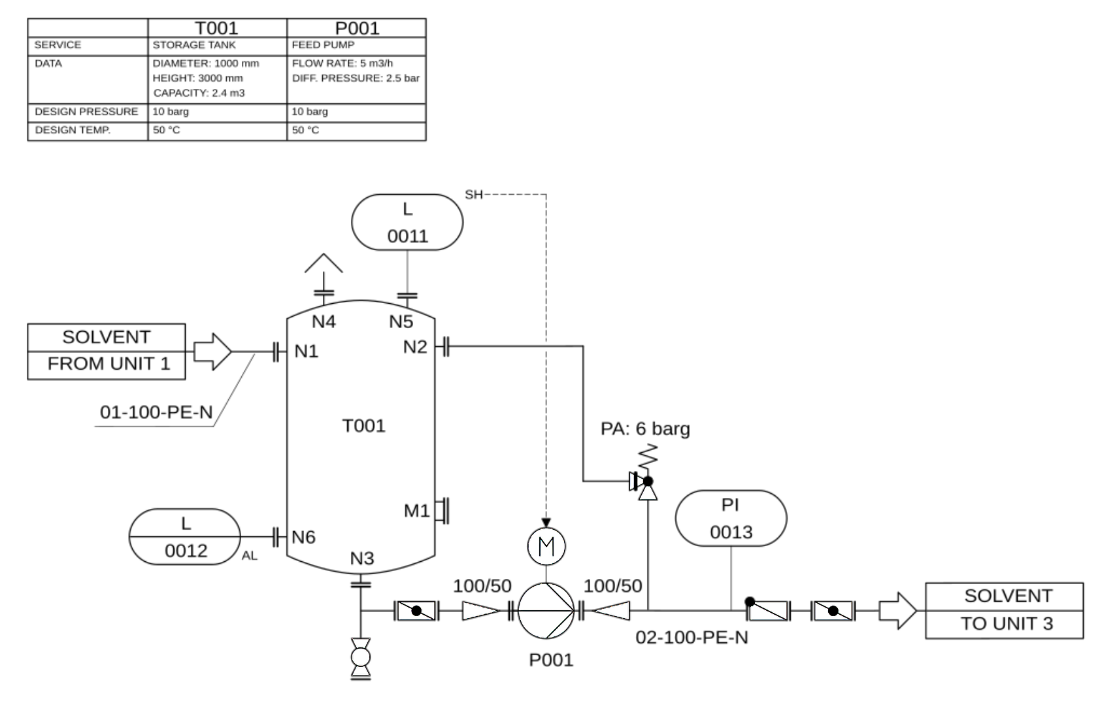
Use the sample P&ID to read a complex physical system as a logical arrangement of connected components. section 2.3.4
A P&ID can serve two related digital-twin jobs. Its symbols are a starting point for extracting a structured model of the physical system. As an interactive schematic, its identifiers can also be linked to other information, including time-series data, so operators can retrieve context from the drawing rather than search separately. section 2.3.4 section 6.2.3
From drawing to candidate data
A vision-capable model can receive a P&ID image and return structured JSON. One example output records a storage tank with dimensions, design conditions, and an inlet connection, with fields for instruments, lines, and control systems. The result is a candidate extraction—not a verified description of the facility. section 2.3.4
Listing 2.5 Structured JSON representation of the P&ID returned by Claude (truncated)
{
  "equipment": [
    {
      "id": "T001",
      "type": "STORAGE_TANK",
      "service": "Storage Tank",
      "data": {
        "diameter": "1000 mm",
        "height": "3000 mm",
        "capacity": "2.4 m3"
      },
      "design_conditions": {
        "pressure": "10 barg",
        "temperature": "50 °C"
      },
      "connections": [
        {
          "id": "N1",
          "type": "inlet",
          "line": "01-100-PE-N",
          "source": "UNIT 1",
          "description": "Solvent inlet from Unit 1"
        }
      ]
    }
  ],
  "instruments": [],
  "lines": [],
  "control_systems": []
}
The truncated JSON example shows the kinds of equipment attributes and connections that can be extracted from a P&ID. section 2.3.4
Legacy P&IDs may be paper documents or scanned PDFs with multiple revisions and annotations. Revision layers, handwriting, overlapping symbols, and ambiguous elements make automated interpretation unreliable. Have domain experts validate extracted data and align it with interoperable standards; ad hoc JSON alone is not a dependable digital model. section 2.3.4
