A pivot table reshapes a data frame into a compact comparison grid. Choose one categorical column for row labels, another for column labels, and a numeric column for cell values. Each intersection holds the single matching value or, when several records match, their mean by default. The result is a new data frame designed for comparing many category combinations at once. section 4.12 section 4.0
Compare product sales by quarter and year
For sales data with year, quarter, and product-A values, put quarter on the index and year in columns. Each cell then shows product A's sales for one quarter-year combination: df.pivot_table(index='quarter', columns='year', values='A') The returned table has Q1–Q4 as rows and 2018–2019 as columns, making changes across years easier to scan than in the original records. section 4.12 section 4.12
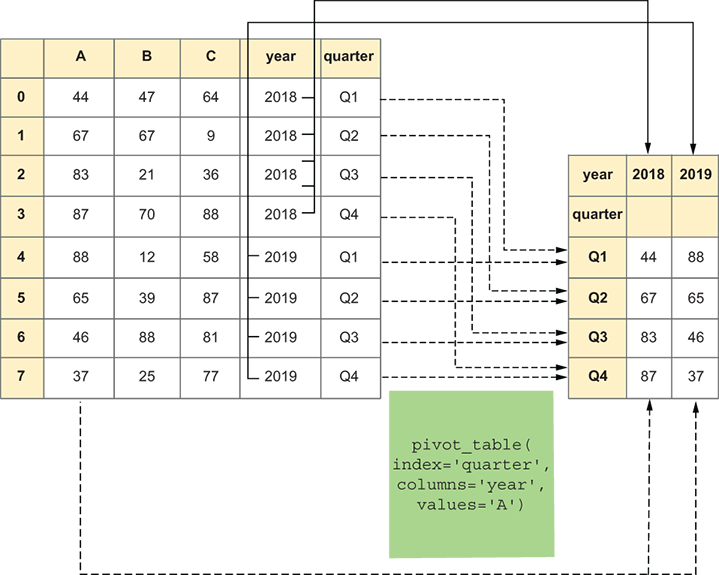
Use the diagram to trace how source records become row labels, column labels, and intersection values. section 4.12
Start with the question, not the method: what varies down the rows, what comparison belongs across columns, and what measurement belongs in each cell? Use `aggfunc` when repeated category pairs need a different summary. For example, `aggfunc='max'` finds the tallest athlete for every sport-year pair, while `aggfunc='size'` counts records in each quarter-year pair. section 4.14 section 4.12
Pivot tables support progressively richer comparisons:
- Compare athletes' average ages across years and teams with Year as rows, Team as columns, and Age as values. section 4.14
- Find maximum heights by sport and year using Height values and `aggfunc='max'`. section 4.14
- Analyze mean salary by country and education level, then restrict the data through a join before rebuilding the grid. section 8.2
- Place more than one field in the index to compare medal counts by year and season. section 4.16
Prepare the input first when necessary: select relevant columns, filter rows to the population of interest, and handle missing values according to the question. A pivot table is based on actual columns rather than the existing index, so a default numeric index is sufficient for the Olympic comparison. After creating a grid, select and sort a result column to answer a focused ranking question. section 4.14 section 8.2
`df.pivot` creates a reshaped table without aggregation, whereas `df.pivot_table` summarizes repeated category combinations. Use the latter when categories can occur more than once and you need a mean, maximum, count, or another aggregate. section 4.0 section 4.12

