A placeholder page gives a website its structure before its final content is ready. It has a title and page identity, while text and media can be added later. section 1.6.3
Create placeholder pages while planning the site:
- Open Pages > Add New. section 3.6.1
- Enter the page title and leave the content area empty. section 3.6.1
- Click Publish for each page. section 3.6.1
- Repeat the process for child pages so the site structure can be organized before writing content. section 1.6.3 section 3.6.1
Restaurant practice site
Create empty child pages titled Tex Mex Meals, Spicy Thai, Chinese Cuisine, French Fare, Italian Ingredients, Gourmet, and Greek Blog. Add their content after the structure and menu are arranged. section 3.6.1
Figure 3.17 This is where you assign a child page to its parent. In effect, you create the parent/child page relationship here.
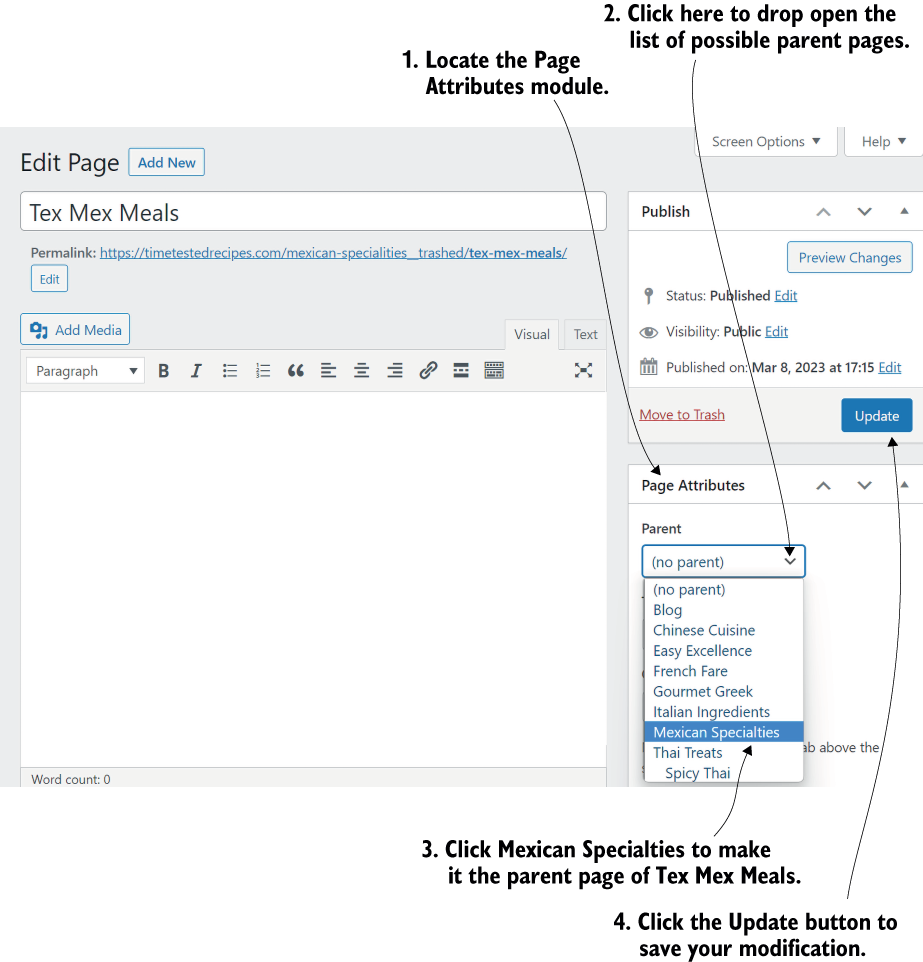
Use the page settings to assign a placeholder page to its parent and establish the parent-child relationship. section 3.6.1
