Playwright automates tests against web pages. For an end-to-end test of a microservices application, it opens the frontend in a browser while the gateway, other services, and database are running. These tests are slower than tests of individual services, but they exercise the application from the customer's point of view. section 9.8
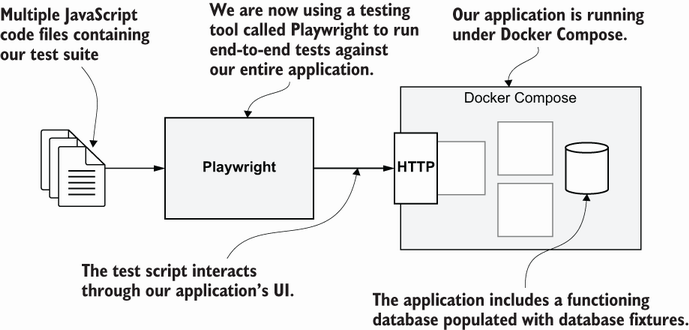
The diagram shows where Playwright sits when Docker Compose runs the application under test. section 9.8
Start the application before running the tests: `docker compose up --build`. Wait until the gateway is online. Seed the database with a fixture so the browser encounters predictable data; unlike a unit test, this example does not mock the application behind the frontend. section 9.8 section 10.6.2
Check a video list
In an asynchronous Playwright test, load the `two-videos` fixture, then call `page.goto('/')`. The route is relative to the configured base URL. Use `page.locator('#video-list>div')` and `expect(videos).toHaveCount(2)`; then inspect each video's link text and `href`. The `page` argument controls the browser page, while locators select elements from its DOM. section 9.8.5
Run and report the tests:
- `npx playwright test` runs the suite; `npx playwright test --reporter=list` puts pass and fail results in the terminal, which is useful for CI/CD. section 9.10 section 9.8.5
- Configure an npm `test` script to run `playwright test --reporter=list --workers 1` when tests share a database. A single worker avoids parallel tests interfering through that shared state. section 9.8.6
Playwright's generated configuration can set up tests across multiple browsers, and its default headless mode suits CI/CD. Visual reports and debugging tools are also available. `npm test` is only a project convention: check its script, since another project may use it to run Jest instead. section 9.8.1 section 10.6.2

