Podman is a daemonless container engine for developing, managing, and running OCI containers on Linux. It runs rootful or rootless, supports individual containers and pods, and provides a Docker-compatible command-line interface. section 1.1 section 1.0
Podman follows a fork/exec design: the user invokes Podman, Podman launches an OCI runtime, and that runtime starts the container as a child process. No continuously running, root-owned daemon is required; containers continue running after the Podman command exits. section 1.3.3 section 1.3.4
Figure 1.9 Podman fork/exec architecture. The user launches Podman, which executes the OCI runtime, which then launches the container. The container is a direct descendant of Podman.
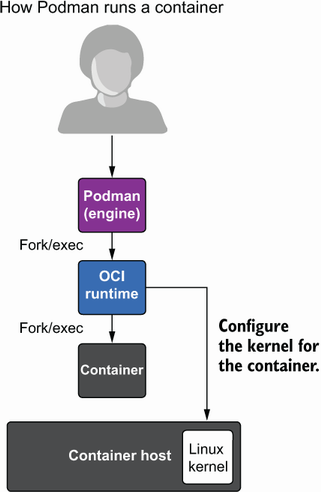
The process-flow diagram contrasts Podman’s direct parent-child relationship with Docker’s client, daemon, and containerd chain. section 1.3.3
Podman’s operational model combines familiar workflows with Linux-native isolation and configuration:
- Runs containers under an unprivileged account through user namespaces; processes remain owned by the user and retain no capabilities beyond a normal user. section 1.3.2 section 1.3.12
- Uses Linux namespaces, cgroups, storage, and an OCI runtime such as runc, crun, Kata, or gVisor to construct and launch containers. section 1.2.3 section 1.1
- Manages pods containing one or more containers that share storage and network resources, while remaining primarily a single-host engine rather than an orchestrator. section 1.3.8 section 1.4
- Accepts registry, OCI, directory, Docker archive, OCI archive, and Docker-daemon image transports, with configurable registries, mirrors, blocking, and signature policies. section 1.3.10 section 1.3.9
Run and publish a web service
Run an interactive disposable shell with `podman run -ti --rm registry.access.redhat.com/ubi8/httpd-24 bash`. For a background service, use `podman run -d -p 8080:8080 --name myapp registry.access.redhat.com/ubi8/httpd-24`; inspect its binding with `podman port myapp` and stop it with `podman stop myapp`. section 2.1.1 section 2.1.2 section 2.1.3
Table 1.2 Podman and Docker feature comparison (view table figure)
The comparison table highlights Podman’s Docker-compatible CLI alongside rootless namespaces, fork/exec, systemd integration, and REST API support. section 1.3.1

