A point prompt is a location selected in an image to tell a segmentation model which object or region to segment. A single foreground point identifies the object containing it; additional labeled points can refine ambiguous boundaries. section 11.4.4
Use point prompts by supplying:
- A point coordinate, represented as an image location such as (580, 480). section 11.4.4
- A label for each point: 1 marks foreground to include, while 0 marks background to exclude. section 11.4.4
- Image, point, and label arrays with batch dimensions and float32 values when calling the model. section 11.4.4
- A selected output mask from the candidate masks returned with quality scores. section 11.4.4
Prompting an image in R
Prepare one foreground point and pass it with the image to the model: input_point <- rbind(c(580, 480)); input_label <- 1; outputs <- model |> predict(list(images = image |> np_array("float32") |> np$expand_dims(0L), points = input_point |> np_array("float32") |> np$expand_dims(0L), labels = input_label |> np_array("float32") |> np$expand_dims(0L))). The result contains candidate masks and their predicted intersection-over-union scores; display the selected mask with the prompt point overlaid. section 11.4.4
input_point <- rbind(c(580, 480))  #1
input_label <- 1  #2

display_image(image)
display_points(input_point)
Use the compact R listing to inspect the coordinate and foreground label used for a point prompt. section 11.4.4
Figure 11.14 Alternative segmentation masks for the banana prompt
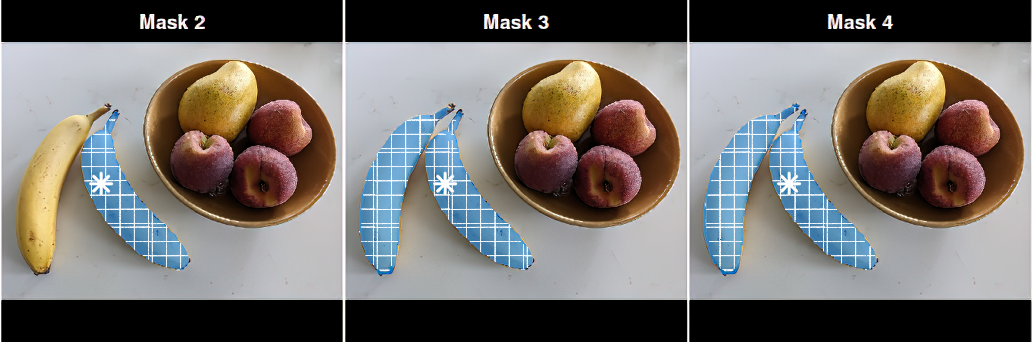
Compare alternative masks when one banana point produces multiple plausible segmentations. section 11.4.4
