A policy initiative groups related Azure Policy definitions under one governance objective. Each definition controls one resource configuration or business rule; the initiative makes the coordinated set easier to assign and manage. section 10.2.1 section 10.9
Use an initiative when a security or operational outcome needs several controls rather than one rule. For example, ensuring VM monitoring can require separate definitions for Windows agents, Linux agents, and managed identities. Assign the initiative at the highest applicable scope so Azure Policy evaluates existing resources for compliance while reducing overlapping assignments; where policies overlap, the most restrictive policy takes precedence. section 10.2.1 section 10.4 section 10.9
Build and use an initiative as a governed bundle:
- Map each business rule to a policy definition, using built-in definitions where they fit and custom definitions where they do not. section 10.2.1 section 10.2.3
- Group the definitions into an initiative and assign that initiative to the intended Azure scope. section 10.3
- Review assignment results in Azure Policy to find resources that do not comply with the included rules. section 10.3
- For security checks, add a custom initiative to Microsoft Defender for Cloud’s Regulatory Compliance dashboard to view policy results alongside other security configurations. section 10.4
Regional VM and storage controls
Create custom definitions that allow virtual machines only in approved regions and storage accounts only in the same two regions, then group both definitions into one initiative. The resulting assignment evaluates the environment against the combined regional baseline rather than requiring separate management of each rule. section 10.3
Figure 10.5 A custom policy initiative displayed in the Regulatory Compliance dashboard in Microsoft Defender for Cloud
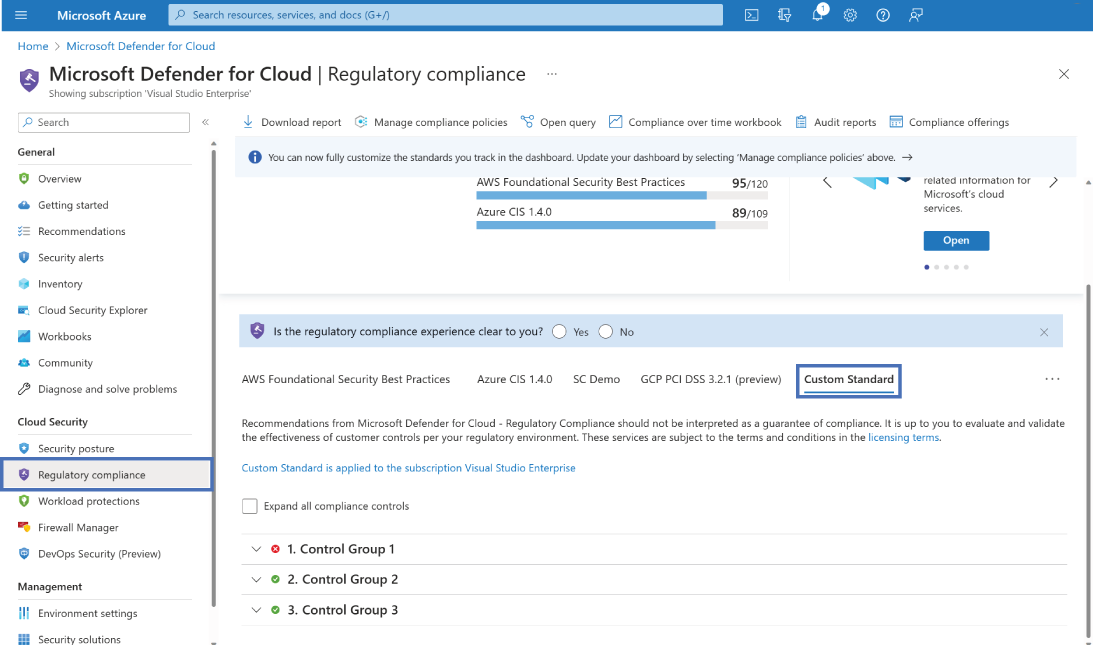
This dashboard view shows how a custom policy initiative can surface as a centralized security and compliance check in Microsoft Defender for Cloud. section 10.4
