A pom.xml file is Maven’s XML build descriptor for a Quarkus project. It organizes dependencies, build plugins, platform version management, profiles, and related build settings within the standard Java project structure. section 2.2 section 2.2.1
The most important pom.xml areas provide the following controls:
- Dependencies add Quarkus extensions and testing artifacts such as quarkus-rest, quarkus-arc, quarkus-junit5, and Rest Assured. section 2.2.1
- The Quarkus BOM supplies compatible versions for platform extensions through dependencyManagement, while some Quarkiverse extensions require explicit versions. section 2.2.1
- The Quarkus Maven plugin packages application artifacts, manages Dev mode, and runs build, code-generation, test-code-generation, and native-image-agent goals. section 2.2.1
- Profiles activate alternate build behavior, including a native profile that enables native-image support and allows integration tests to run. section 2.2.1
Adding a Kafka capability
Use the Quarkus CLI to search installable extensions, filter the messaging category, and run quarkus extension add "quarkus-messaging-kafka". The command updates pom.xml by adding the corresponding Maven dependency. Remove it with quarkus extension remove, or edit the dependencies section directly when the required artifact is already known. section 2.7.3
Figure 2.3 Quarkus application directory structure for Maven-based projects
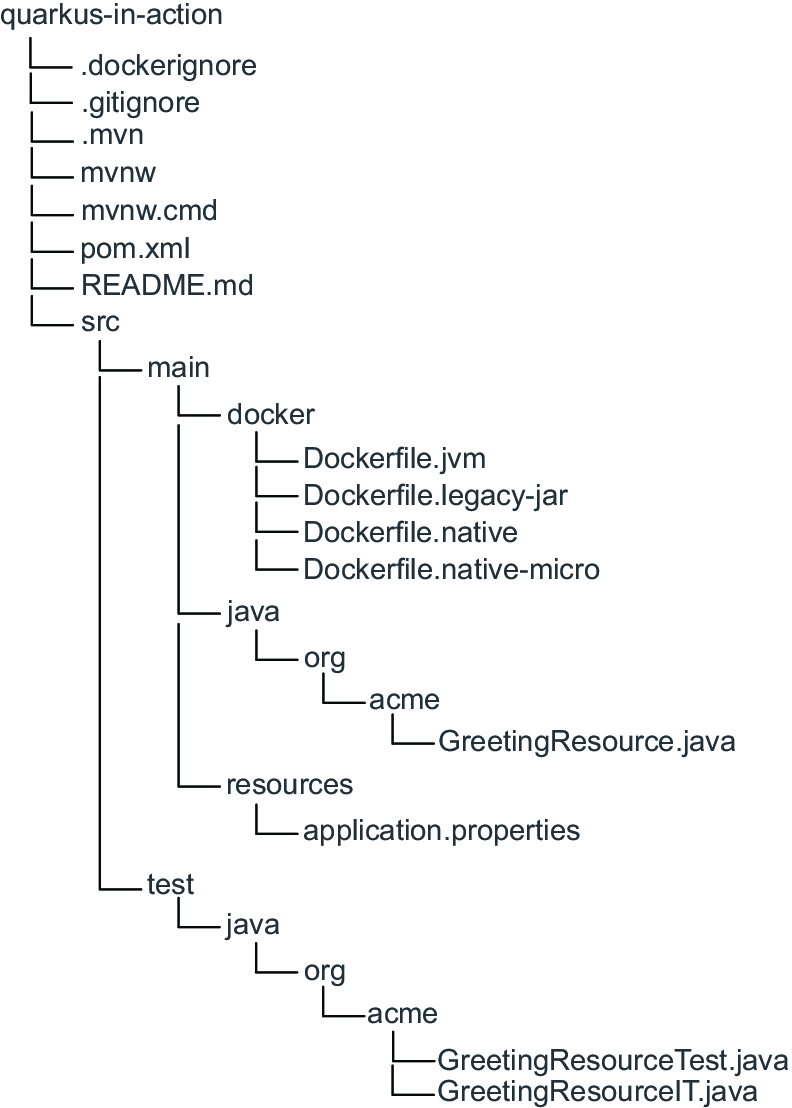
Use the project directory structure to locate pom.xml alongside Java sources, resources, tests, generated Dockerfiles, and Maven Wrapper files. section 2.2


