A port-channel interface is the logical Cisco IOS interface created when multiple physical links join an EtherChannel. Cisco IOS treats the member ports as one connection, allowing the links to remain active without creating a Layer 2 loop. The interface is commonly named Port-channel1 or Po1. section 16.1 section 16.5
A port-channel interface matters because it:
- Combines link capacity and redundancy; two 1-Gbps links appear logically as one 2-Gbps connection, while traffic is distributed across physical members. section 16.2.1
- Carries Layer 2 settings such as access or trunk mode. Configure these settings on the port-channel interface so member ports remain consistent. section 16.2.1 section 16.5
- Can represent a routed Layer 3 EtherChannel. Apply no switchport to the member ports, then configure the IP address on the port-channel interface—not on individual members. section 16.4
- Appears as the single interface considered by STP, although physical links still carry frames; STP may block the entire port channel in a larger topology. section 16.1
Creating and checking Po1
Assign two ports to channel group 1 with channel-group 1 mode desirable. IOS automatically creates Port-channel1. Configure interface po1 and apply switchport mode trunk. Verify with show etherchannel summary: Po1(SU) indicates an active Layer 2 port channel, while member ports marked P are bundled. If members show I, they remain stand-alone and the EtherChannel has not formed. With LACP, use active or passive instead; an active/passive pair forms the channel. section 16.2.1 section 16.5
Figure 16.6 The physical and logical topologies of the SW1–SW2 connection. Physically, SW1 and SW2 are connected by two 1 Gbps links. Logically, they are connected by a single 2 Gbps link via their Po1 interfaces.
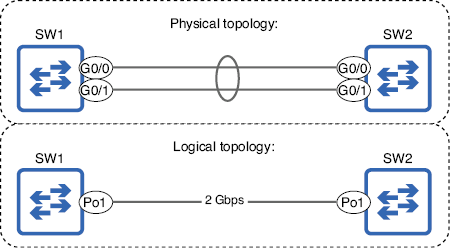
Compare the physical topology of separate member links with the logical topology represented by Po1. section 16.2.1
