Port mapping connects a host port to a port exposed by a container, making a containerized service reachable from outside the container. Docker assigns the host-side port when the container starts; the application continues listening on its container port. section 13.3.1
Keep these two operations separate:
- EXPOSE 5101 declares that the service uses port 5101 inside the container; it does not publish that port. section 13.3.1
- A host assignment such as 5000:5101 maps host port 5000 to container port 5101. section 13.3.1
- Access the service through the host port, such as http://localhost:5000, rather than the exposed container port. section 13.3.1
Mapping an ASP.NET service
A service listening on container port 5101 remains unreachable at http://localhost:5101 when only EXPOSE 5101 is declared. Starting the container with host port 5000 mapped to container port 5101 makes the application available at http://localhost:5000. section 13.3.1
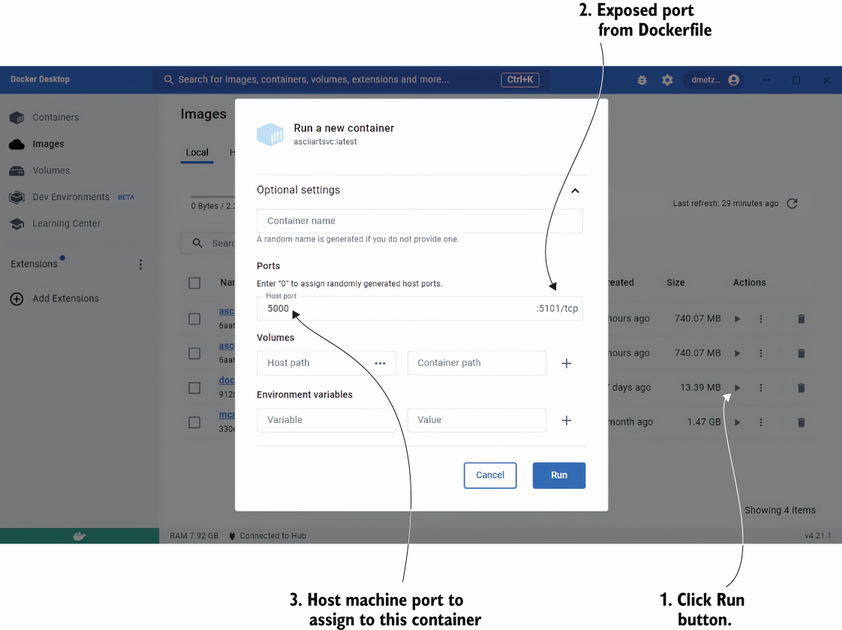
Docker Desktop's container-start dialog shows where the host port is assigned for the exposed container port. section 13.3.1

