liveBook · Manning

PowerShell script

As explained in Learn PowerShell Scripting in a Month of Lunches, Second Edition: Write and organize scripts and tools

A PowerShell script is a text-file program containing a structured sequence of PowerShell commands and instructions, commonly using the .ps1 filename extension.

A PowerShell script is a text-file program containing a structured sequence of PowerShell commands and instructions, usually saved with the .ps1 extension. It supports tasks ranging from simple administration to complex automation and configuration workflows. section 1.1

Effective scripting treats commands as small, reusable tools that snap together. Functions and modular instructions reduce duplicated effort, debugging work, and maintenance overhead compared with one-off console typing. section 1.1

Use a practical script-development loop:

  • Discover and test individual commands interactively before assembling them into a script. section 9.7
  • Experiment with different scenarios and inspect command output to confirm behavior and reduce bugs. section 9.7
  • Use a virtualization or cloud-based test environment when experimentation could affect production systems. section 9.7
  • Handle errors deliberately rather than suppressing them globally, and consider how failures should be logged. section 15.9

A script under review

Save a deliberately buggy disk-checking function as a .ps1 file and open it in VS Code. The file extension activates PowerShell support, allowing the script to be inspected and debugged before execution. section 23.5.1

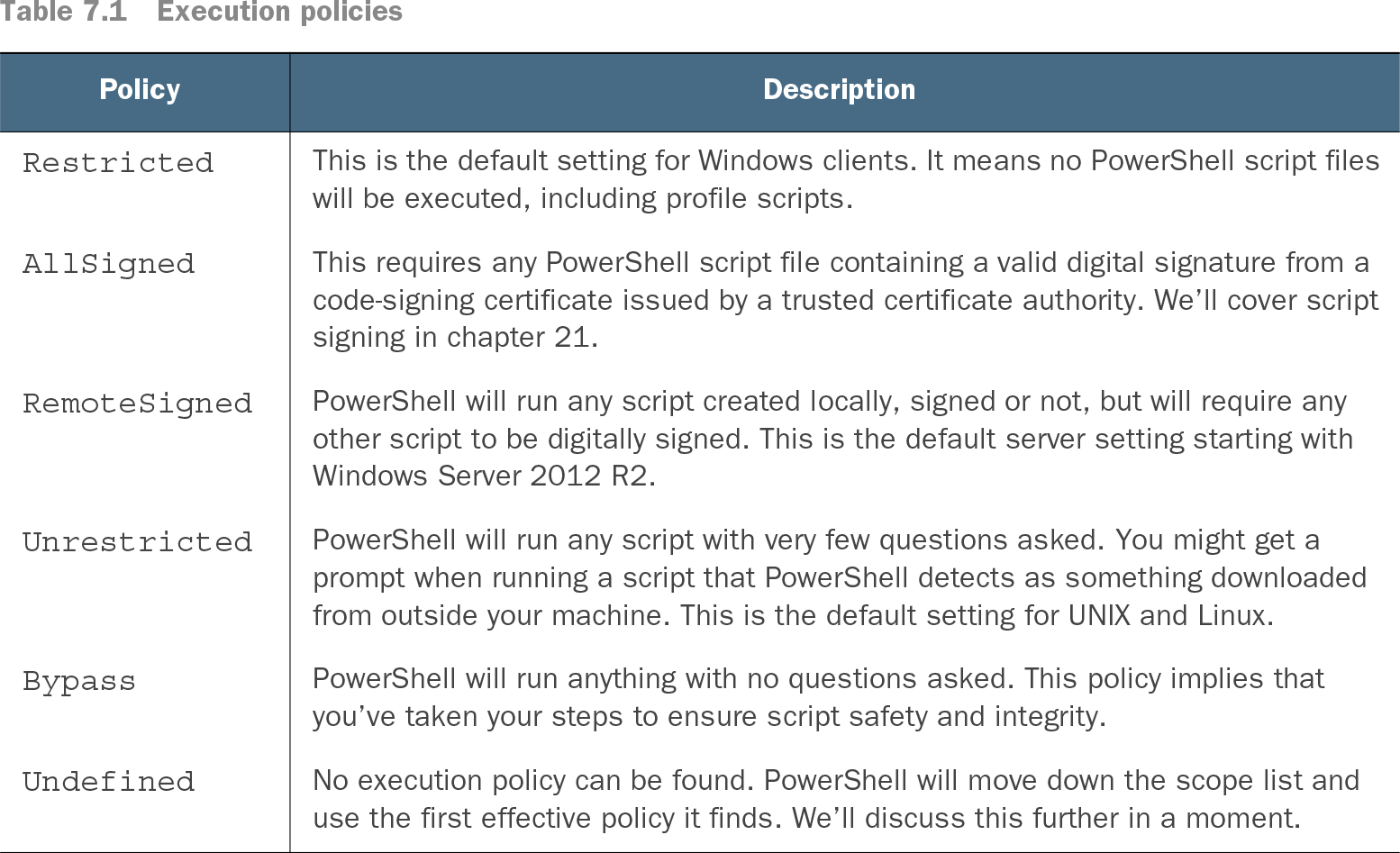
Table 7.1 Execution policies (view table figure)

Policy

Description

Restricted

This is the default setting for Windows clients. It means no PowerShell script files will be executed, including profile scripts.

AllSigned

This requires any PowerShell script file containing a valid digital signature from a code-signing certificate issued by a trusted certificate authority. We’ll cover script signing in chapter 21.

RemoteSigned

PowerShell will run any script created locally, signed or not, but will require any other script to be digitally signed. This is the default server setting starting with Windows Server 2012 R2.

Unrestricted

PowerShell will run any script with very few questions asked. You might get a prompt when running a script that PowerShell detects as something downloaded from outside your machine. This is the default setting for UNIX and Linux.

Bypass

PowerShell will run anything with no questions asked. This policy implies that you’ve taken your steps to ensure script safety and integrity.

Undefined

No execution policy can be found. PowerShell will move down the scope list and use the first effective policy it finds. We’ll discuss this further in a moment.

Compare execution policies before deciding where scripts should run. Client systems commonly begin with Restricted, while other policies permit local, signed, or broadly sourced scripts. section 7.2

PowerShell executes instructions without automatically asking for confirmation, so organizational safeguards matter. Inspect the current policy with Get-ExecutionPolicy, change execution settings only where scripts are intended to run, and prefer centrally managed policy decisions. section 7.1 section 7.2

How Learn PowerShell Scripting in a Month of Lunches, Second Edition: Write and organize scripts and tools covers it

How deep it goes
Explains file structure, toolmaking, testing, debugging, error handling, and execution safeguards without detailing the PowerShell runtime.
Examples
Uses command-line experiments, CIM discovery, a text-file logger, and a deliberately buggy disk-checking function.
What it assumes
Assumes basic PowerShell command-line use while teaching script files, reusable tools, testing, debugging, and security controls.
What you can do after
Build it from scratch, test commands incrementally, debug .ps1 files, manage errors, and configure safer execution.
How it connects
Connects scripts with commands, functions, automation, configuration management, testing, debugging, error handling, and execution policy.

Related concepts

This explainer was generated by Manning's knowledge graph from the text of Learn PowerShell Scripting in a Month of Lunches, Second Edition: Write and organize scripts and tools. The section links point to the parts of the book it draws on.