liveBook · Manning

Prefab

As explained in High Performance Unity Game Development

A Unity asset template that stores a reusable GameObject hierarchy and its component configuration.

A Unity prefab can contain the UI objects in a main menu. Accessing its buttons raises practical concerns about editor assignments, collaboration, and references that break when variables are renamed. section 8.2.1

Common ways to access menu buttons have trade-offs:

  • Finding an object by name with GameObject.Find() is slow and can fail if the object is renamed. section 8.2.1
  • Assigning public variables in the editor requires repeated prefab handoffs and exposes the prefab to more of the codebase. section 8.2.1
Figure 8.6 The main menu prefab, including the UI objects we need to access using code.
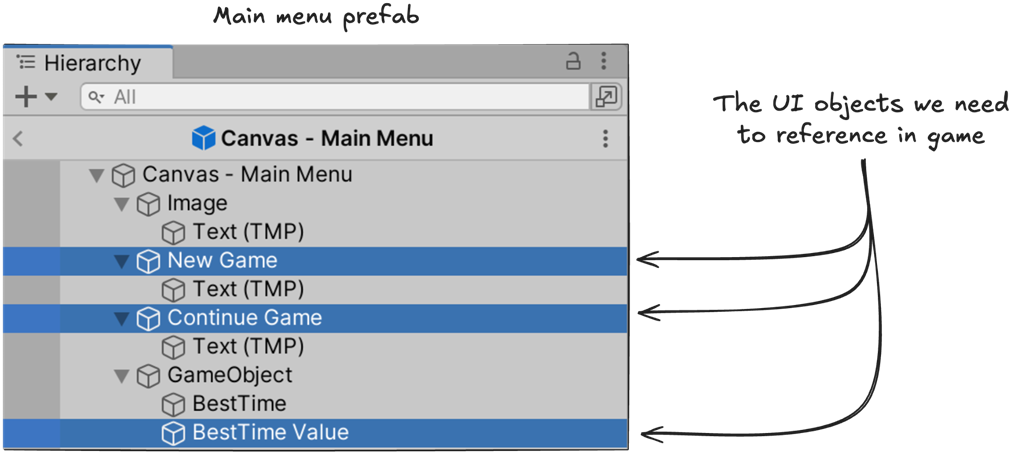
The figure shows the main menu prefab and the UI objects code needs to access. section 8.2.1

How High Performance Unity Game Development covers it

How deep it goes
Compares name lookup and editor-assigned public variables, noting performance, renaming, and collaboration risks.
Examples
Uses Continue and New Game buttons in a main menu as the concrete UI example.
What you can do after
Evaluate menu UI reference approaches by considering lookup speed, rename fragility, and prefab handoffs.
How it connects
Links prefabs to Unity UI, GameObject.Find(), public variables, and saved-game state.

This explainer was generated by Manning's knowledge graph from the text of High Performance Unity Game Development. The section links point to the parts of the book it draws on.