liveBook · Manning

Primary menu

As explained in WordPress Power Toolkit: Harness AI to build next-level websites

A primary menu is a WordPress navigation-menu location positioned by a theme near the top of site pages.

A primary menu is a WordPress navigation-menu location that places a selected menu near the top of each site page. Its exact position depends on the theme or an installed menu plugin. section 3.6.1

Set up a primary menu from Appearance > Menus:

  • Click the View All tab in Add Menu Items so every page is available. section 3.6.1
  • Enter a name such as Main Menu, then click Create Menu. section 3.6.1
  • Select all pages, click Add to Menu, and choose the Primary Menu location. section 3.6.1

Example

For a site with several pages, create a menu named Main Menu, add every page, and assign it to Primary Menu so visitors can find navigation near the top of each page. section 3.6.1
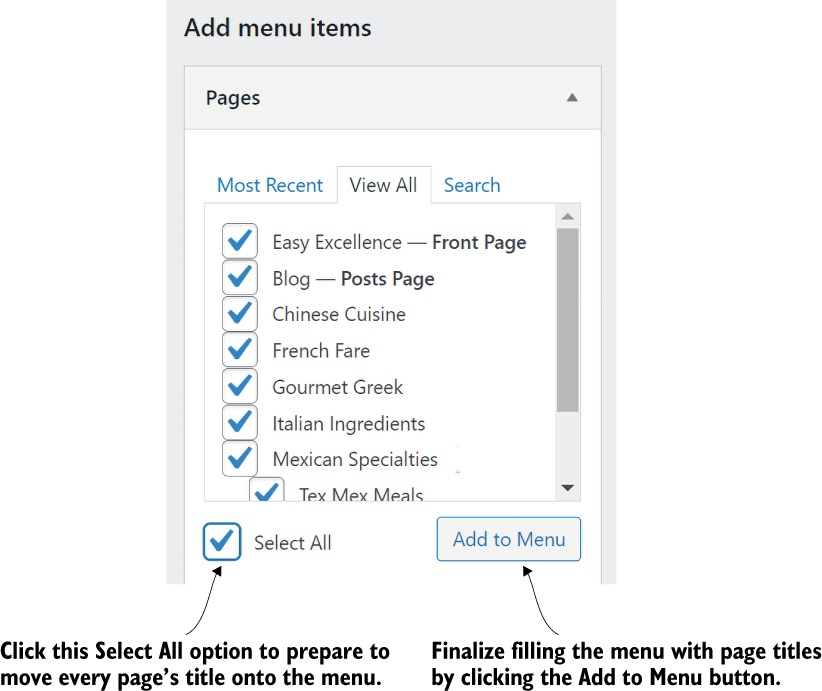
Figure 3.19 Add all your pages to the menu.

Use the visual reference to identify the control that adds all pages to the menu. section 3.6.1

How WordPress Power Toolkit: Harness AI to build next-level websites covers it

How deep it goes
Explains menu creation and assignment through interface steps, while deferring placement options to the theme or menu plugin.
Examples
Uses a Main Menu containing all site pages and references interface figures for viewing and adding pages.
What you can do after
Configure a WordPress menu and assign it to the Primary Menu location.
How it connects
Connects WordPress pages, navigation menus, themes, and menu plugins.

Related concepts

This explainer was generated by Manning's knowledge graph from the text of WordPress Power Toolkit: Harness AI to build next-level websites. The section links point to the parts of the book it draws on.