A process manager monitors an application process and restarts it when it crashes or stops responding. This keeps the application available for handling requests. section 27.3.1
In Linux deployments, a reverse proxy forwards incoming requests, while a separate process manager such as systemd supervises the application. This separation matters because the reverse proxy may run on another server and cannot restart the application. IIS combines both responsibilities on Windows; Docker deployments commonly use a process manager alongside a separate reverse proxy. section 27.3.1
Figure 27.9 In Linux, it’s common for a reverse proxy to be on a different server from your app. The reverse proxy forwards incoming requests to your app, while a process manager, such as systemd, monitors your apps for crashes and restarts it as appropriate.
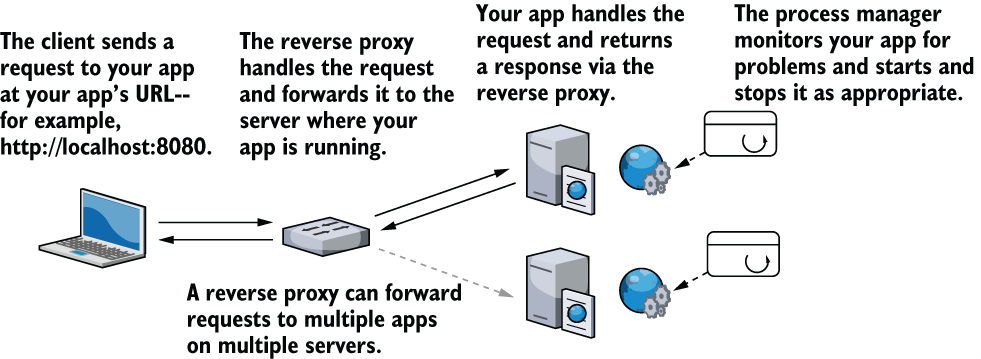
Use the deployment diagram to distinguish request forwarding by the reverse proxy from crash monitoring and restarting by the process manager. section 27.3.1

