A profiler observes a running application to reveal which code executes, how long methods run, and how the application uses CPU, memory, threads, and database connections. It narrows an investigation before you open a debugger, especially when the codebase is unfamiliar or debugging would disturb multithreaded behavior. section 1.2.1 section 5.4
Use profiling to ask focused investigative questions:
- Which methods and threads are actually running when a capability is triggered? section 5.1.2
- Which code consumes excessive CPU or memory, and could zombie threads or memory leaks explain the symptom? section 5.1.1
- Where does execution spend time, and which methods are invoked unusually often? section 6.4
- Which SQL queries reach the database, how often do they run, and which application code issued them? section 6.3
From abnormal CPU use to a concurrency defect
A producer-consumer application starts two producer and two consumer threads that concurrently modify an ArrayList without synchronization. VisualVM shows substantial CPU use, active threads, and exceptions; the evidence points toward a race condition and zombie-thread behavior. Synchronizing access to the shared list changes the resource profile: CPU use falls and the threads’ execution becomes visibly coordinated. The profiler identifies the symptom and narrows the code requiring correction; source inspection or a thread dump can continue the diagnosis. section 5.2.2
Start with sampling because it consumes fewer resources and provides the execution big picture. If necessary, focus detailed profiling on selected packages or classes to measure method duration, CPU time, invocation counts, locks, or JDBC queries. Profiling is investigative evidence, not a single-cause answer: follow the results with code reading, debugging, SQL analysis, lock profiling, or a thread dump. section 6.4 section 7.4 section 8.1.1
Figure 1.5 Identifying code in execution with a profiler. If you don’t know where to start debugging, the profiler can help you to identify the code that is running and give you an idea of where you can use the debugger.
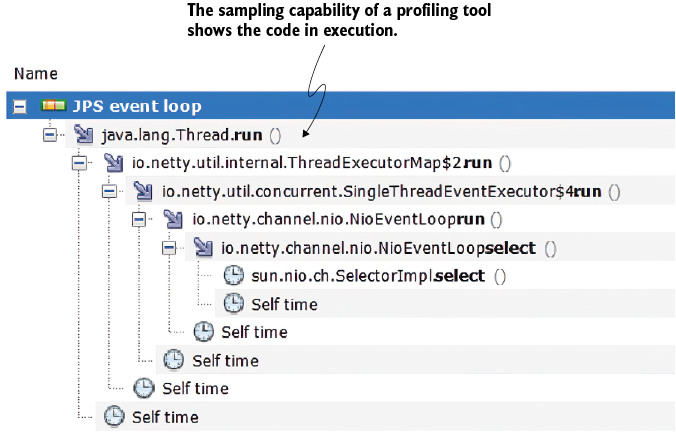
Shows how a profiler identifies executing code and guides the placement of debugger breakpoints. section 1.2.1


