Prompt flow is an open-source Microsoft tool for building, running, deploying, and evaluating prompts and agent profiles. It began within Azure Machine Learning Studio and supports scalable, parallel evaluation of many prompt variations. section 9.3 section 9.8
A flow connects prompt, LLM, embedding, Python, and output components in a directed acyclic graph. The VS Code visual editor displays these components so you can inspect and modify a flow while its configuration remains YAML-based. section 9.3.1 section 10.1.1
A practical prompt flow workflow includes:
- Install the prompt flow packages and VS Code extension inside a Python virtual environment. section 9.3.1
- Create an LLM connection through the extension, entering the key through the terminal rather than storing it in YAML. section 9.3.1
- Open flow.dag.yaml in the visual editor, configure inputs and connections, and run the flow with Play or Test. section 9.3.1 section 10.1.1
- Define prompts with Jinja2 templates, then change roles, inputs, or other profile elements without rebuilding the entire flow. section 9.3.2 section 9.4
- Compare prompt, model, temperature, and token-limit variations through single or batch runs, then score results with an evaluation flow. section 9.4 section 9.8
Time-travel movie recommender
Open a recommender flow, provide inputs such as Subject, Genre, Format, and Custom, and run its Jinja2 profile. To test improvements, create prompt variants, execute them together, and evaluate which recommendations best satisfy a rubric. Build the result as a local web application, enter user_input in the browser, or deploy it as a Docker container. section 9.3.2 section 9.3.3 section 9.4
Figure 9.9 Opening the prompt flow visual editor
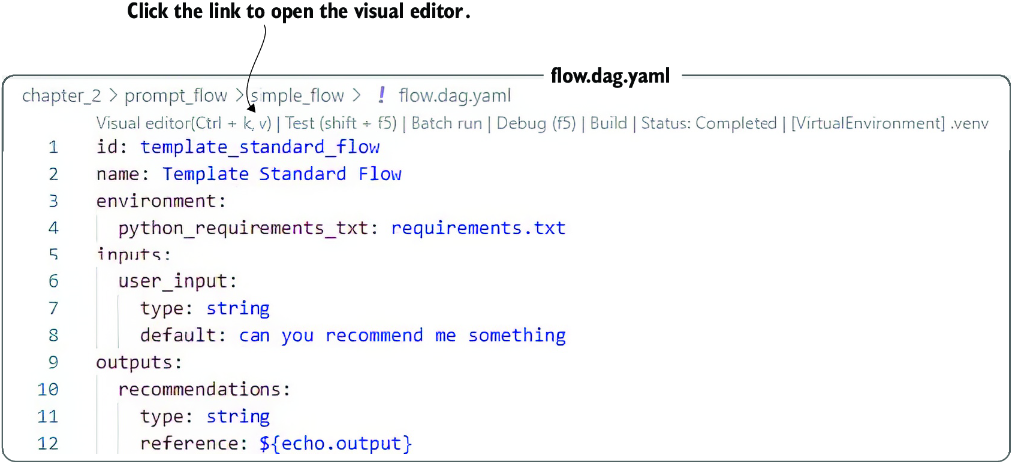
Use the visual-editor figure to see how a flow is opened and arranged before configuring its LLM blocks and inputs. section 9.3.1
Table 9.1 LLM variation options in prompt flow
|
Option
|
Evaluation option examples
|
Notes
|
|---|---|---|
|
Jinja2 prompt template
|
Compare system prompt variations, user prompt variations, or mixed prompt variations.
|
Some endless combinations and techniques can be applied here. Prompt engineering is evolving all the time.
|
|
LLM
|
Compare GPT-9.5 to GPT-4.
Compare GPT-4 to GPT-4 Turbo.
Compare open source models to commercial models.
|
This is a useful way to evaluate and ground model performance against a prompt. It can also help you tune your profile to work with open source and/or cheaper models.
|
|
Temperature
|
Compare a 0 temperature (no randomness) to a 1 (maximum randomness).
|
Changes to the temperature can significantly change the responses of some prompts, which may improve or degrade performance.
|
|
Max tokens
|
Compare limited tokens to larger token sizes.
|
This can allow you to reduce and maximize token usage.
|
|
Advanced parameters
|
Compare differences to options such as
top_p,
presence_penalty,
frequency_penalty, and
logit_bias.
|
We’ll cover the use of these advanced parameters in later chapters.
|
|
Function calls
|
Compare alternative function calls.
|
Function calls will be addressed later in this chapter.
|
Use the variation table to compare prompt templates, LLMs, temperature, and maximum-token settings as evaluation dimensions. section 9.4

