A provisioning profile is an Apple distribution artifact that associates an iOS app with its distribution identity and release configuration. A CI job must install it alongside the distribution certificate before signing the app. section 12.2.3
Configure a provisioning profile for an iOS build by following these steps:
- Export or obtain the distribution profile, then encode it as Base64 for secure storage. section 12.2.3
- Store the encoded profile in the APPLE_PROFILE GitHub Actions secret and store its Apple Developer name in APPLE_PROFILE_NAME. section 12.2.3
- Decode the secret during the macOS job and copy the resulting .mobileprovision file into ~/Library/MobileDevice/Provisioning Profiles. section 12.2.3
- Pass the profile name through CodesignProvision when running dotnet publish with iOS code-signing settings. section 12.2.3
Installing a profile in GitHub Actions
echo ${{ secrets.APPLE_PROFILE }} | base64 --decode > MauiStockTake_iOS_Distribution.mobileprovision mkdir -p ~/Library/MobileDevice/Provisioning\ Profiles cp MauiStockTake_iOS_Distribution.mobileprovision ~/Library/MobileDevice/Provisioning\ Profiles/ A later publish command selects it with /p:CodesignProvision="MauiStockTake iOS Distribution". section 12.2.3
Figure 12.11 The iOS build and sign job is similar to the Android job but decodes (and installs) a distribution certificate instead of a keystore. It will also need to decode and import the provisioning profile.
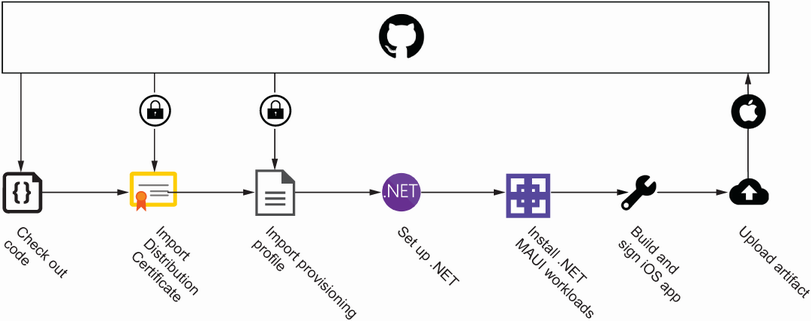
The build-and-sign diagram shows the profile as the iOS-specific artifact that is decoded and imported alongside the distribution certificate. section 12.2.3
