The Python interactive prompt is the interpreter interface marked by >>>, where you enter Python code and immediately see its result. Python reads, executes, and prints each entry in a repeating REPL loop. section 4.3 section 3.3.1
Use the prompt to:
- Experiment with expressions, such as >>> 5 * 4, and observe the response. section 4.3
- Call a defined function repeatedly without adding temporary calls to the program. section 3.3.1
- Run quick tests, then revise the code when an output is wrong; rerun earlier tests after making changes. section 6.3.1
- Enter multi-line structures such as conditionals: >>> starts a new statement, while ... indicates unfinished input. section 4.3.3
Testing a function
After defining money_made, enter >>> money_made(10, 15, 17) to receive 20. Try a loss with >>> money_made(10, 17, 15), which returns -20, or equal prices, which returns 0. section 3.3.1
Figure 3.3 Running Python in an interactive session in VS Code. Note the >>> at the bottom of the TERMINAL tab.
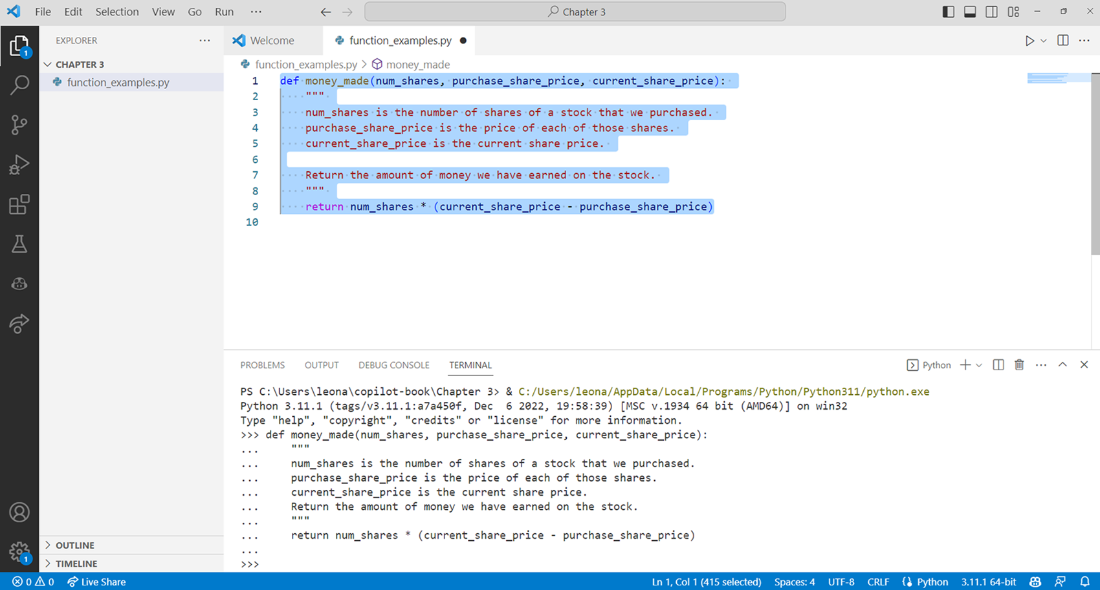
A VS Code terminal figure shows the >>> marker in a running interactive Python session. section 3.3.1
