liveBook · Manning

Query builder

As explained in Java Persistence with Spring Data and Hibernate epub

A query builder is a mechanism that constructs database queries from structured declarations or repository method definitions.

A query builder turns repository method declarations into database queries. In Spring Data JPA, JDBC, and MongoDB, it derives retrieval behavior from method names, so common searches can be declared on a repository interface rather than written as custom queries. section 4.4 section 15.2.1 section 17.3.1

Declare a user search

A repository can declare `findByUsername(String username)`, `findByRegistrationDateBetween(LocalDate start, LocalDate end)`, and `findByUsernameAndEmail(String username, String email)`. The first searches one property; the others express a range and a compound condition. `findAllByOrderByUsernameAsc()` requests a fixed ordering. A method returning `Optional<User>` expresses its expected result through its return type. section 4.4 section 15.2.1

The mechanism removes a prefix such as `find…By`, `get…By`, `query…By`, `read…By`, or `count…By`, then parses the remaining property names and keywords. Keywords include `And`, `Or`, `Between`, comparison operators, `IgnoreCase`, and `OrderBy`. Names must match entity properties: a mismatch produces an error when the application context loads. section 4.4 section 15.2.1

The naming approach is shared, but the resulting query depends on the data store. JPA derives JPQL conditions; MongoDB derives document-query conditions. Spring Data JDBC supports derived queries from version 2.0, but its defined query methods are limited to properties usable in a `WHERE` clause without joins. For needs beyond method names, Spring Data JPA and JDBC also provide `@Query` for custom queries. section 4.4 section 15.2.1 section 17.3.1 section 4.11

Listing 4.7 The UserRepository interface with new methods
Path: Ch04/springdatajpa2/src/main/java/com/manning/javapersistence
 /springdatajpa/repositories/UserRepository.java
 
public interface UserRepository extends JpaRepository<User, Long> {
 
   User findByUsername(String username);
   List<User> findAllByOrderByUsernameAsc();
   List<User> findByRegistrationDateBetween(LocalDate start, 
    LocalDate end);
List<User> findByUsernameAndEmail(String username, String email);
List<User> findByUsernameOrEmail(String username, String email);
List<User> findByUsernameIgnoreCase(String username);
List<User> findByLevelOrderByUsernameDesc(int level);
List<User> findByLevelGreaterThanEqual(int level);
List<User> findByUsernameContaining(String text);
List<User> findByUsernameLike(String text);
List<User> findByUsernameStartingWith(String start);
List<User> findByUsernameEndingWith(String end);
List<User> findByActive(boolean active);
List<User> findByRegistrationDateIn(Collection<LocalDate> dates);
List<User> findByRegistrationDateNotIn(Collection<LocalDate> dates);
 
}

The JPA repository listing shows how property filters, compound conditions, text matching, and ordering appear as method declarations. section 4.4

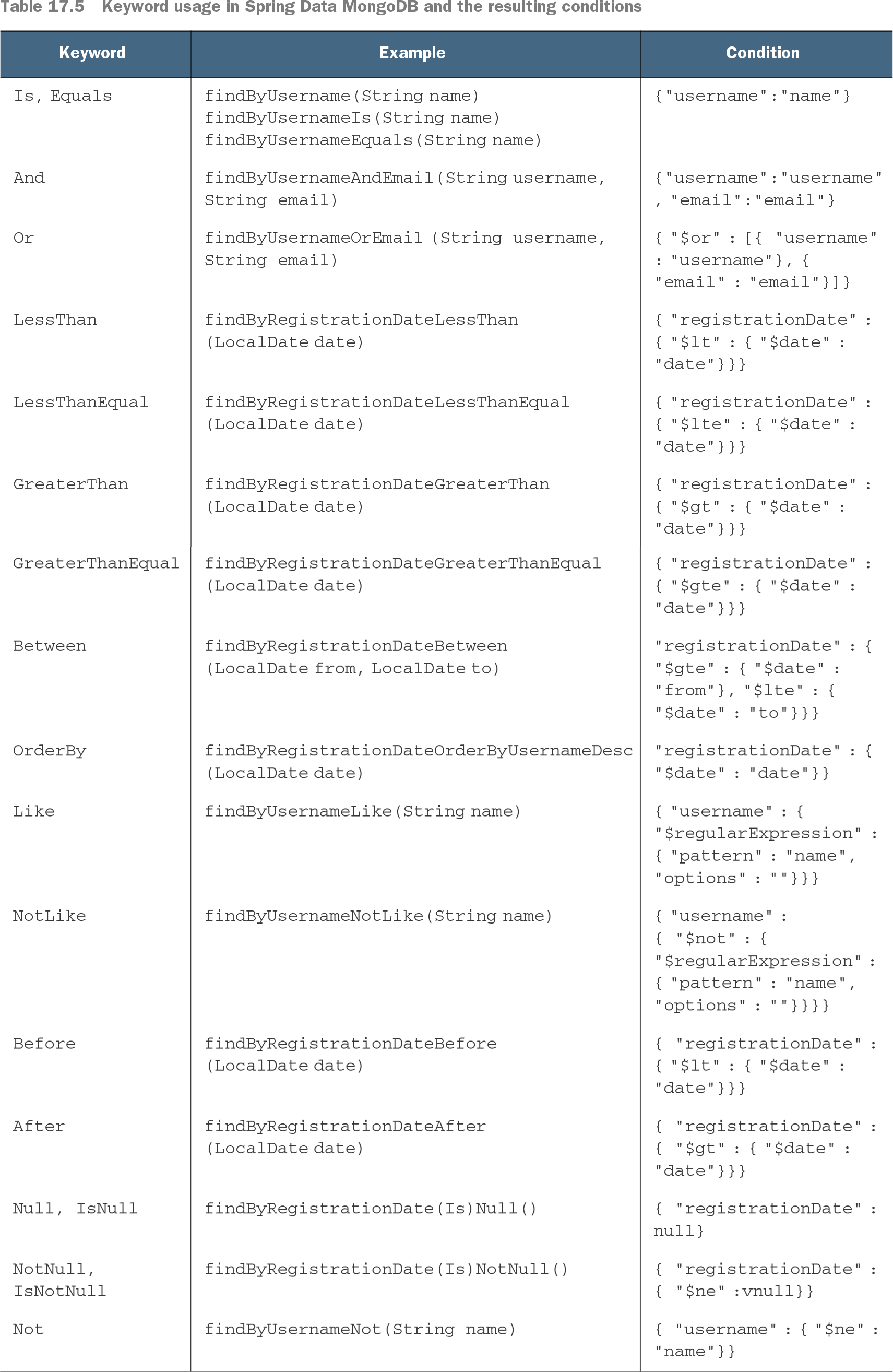
Table 17.5 Keyword usage in Spring Data MongoDB and the resulting conditions (view table figure)

Keyword

Example

Condition

Is, Equals

findByUsername(String name)

findByUsernameIs(String name)

findByUsernameEquals(String name)

{"username":"name"}

And

findByUsernameAndEmail(String username, String email)

{"username":"username", "email":"email"}

Or

findByUsernameOrEmail (String username, String email)

{ "$or" : [{ "username" : "username"}, { "email" : "email"}]}

LessThan

findByRegistrationDateLessThan(LocalDate date)

{ "registrationDate" : { "$lt" : { "$date" : "date"}}}

LessThanEqual

findByRegistrationDateLessThanEqual(LocalDate date)

{ "registrationDate" : { "$lte" : { "$date" : "date"}}}

GreaterThan

findByRegistrationDateGreaterThan(LocalDate date)

{ "registrationDate" : { "$gt" : { "$date" : "date"}}}

GreaterThanEqual

findByRegistrationDateGreaterThanEqual(LocalDate date)

{ "registrationDate" : { "$gte" : { "$date" : "date"}}}

Between

findByRegistrationDateBetween(LocalDate from, LocalDate to)

"registrationDate" : { "$gte" : { "$date" : "from"}, "$lte" : { "$date" : "to"}}}

OrderBy

findByRegistrationDateOrderByUsernameDesc(LocalDate date)

"registrationDate" : { "$date" : "date"}}

Like

findByUsernameLike(String name)

{ "username" : { "$regularExpression" : { "pattern" : "name", "options" : ""}}}

NotLike

findByUsernameNotLike(String name)

{ "username" : { "$not" : { "$regularExpression" : { "pattern" : "name", "options" : ""}}}}

Before

findByRegistrationDateBefore(LocalDate date)

{ "registrationDate" : { "$lt" : { "$date" : "date"}}}

After

findByRegistrationDateAfter(LocalDate date)

{ "registrationDate" : { "$gt" : { "$date" : "date"}}}

Null, IsNull

findByRegistrationDate(Is)Null()

{ "registrationDate" : null}

NotNull, IsNotNull

findByRegistrationDate(Is)NotNull()

{ "registrationDate" : { "$ne" :vnull}}

Not

findByUsernameNot(String name)

{ "username" : { "$ne" : "name"}}

The MongoDB keyword table makes the translation from method-name operators to document-query conditions visible. section 17.3.1


How Java Persistence with Spring Data and Hibernate epub covers it

How deep it goes
Explains name parsing, keywords, return types, and load-time errors, while identifying JDBC's no-join limit.
Examples
Tests user searches by username and registration date alongside compound filters and username ordering.
What it assumes
Builds on Java repository interfaces and mapped entity properties, then explains how method names become queries.
What you can do after
Apply it via Spring Data repository methods to declare property-based searches and recognize when JDBC's derived queries cannot use joins.
How it connects
Connects repository methods to JPQL, MongoDB document queries, `Optional`, and custom `@Query` declarations.

Also explained in

Compare how 2 books explain query builder →

Related concepts

This explainer was generated by Manning's knowledge graph from the text of Java Persistence with Spring Data and Hibernate epub. The section links point to the parts of the book it draws on.