The CSS radial-gradient() function creates a background image whose colors transition outward from one point in a circle or ellipse. Think of dropping food coloring into water: the color spreads from the starting spot. section 17.8
Build the function from a few optional pieces:
- Choose a shape: circle, the default, or ellipse. section 17.10
- Choose an extent: closest-side, farthest-side, closest-corner, or farthest-corner. section 17.10
- Set the starting position with x-y coordinates or keywords such as left top, center, or right bottom. section 17.10
- Add colors and optional color stops, using the same color-stop rules as a linear gradient. section 17.10
A yellow-to-blue corner glow
div { background-color: yellow; background-image: radial-gradient(ellipse farthest-corner at left top, yellow, blue); height: 200px; width: 100%; } <div></div> This creates an ellipse beginning at the element’s top-left corner and spreading toward the farthest corner. For a simpler centered circular gradient, use radial-gradient(yellow, blue). section 17.10
Figure 17.13 Defining a radial gradient, using the radial-gradient() function to specify shape, extent, and color stops
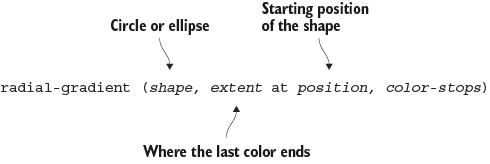
Use the syntax figure to see how shape, extent, position, and color stops fit together. section 17.10

