A range query filters records by an ordering condition, such as an IMDb rating of at least 7. MongoDB indexes order field values in a B-tree, allowing a suitable index to limit the documents scanned. Without one, MongoDB may scan the entire collection. section 7.0 section 7.2.2
Filter ratings and sort titles
To find movies from 1914 rated at least 7, sorted by title, run `db.movies.find({ year: 1914, "imdb.rating": { $gte: 7 } }).sort({ title: 1 })`. A compound index following the Equality, Sort, Range guideline is `db.movies.createIndex({ year: 1, title: 1, "imdb.rating": 1 })`: year supplies the equality condition, title the sort, and rating the range condition. section 7.2.2
Check whether the index fits the queries you actually run:
- Put equality fields first, sorting fields next, and range fields last when applying the ESR guideline. section 7.2.2
- Inspect `explain("executionStats")`. A rating-only query without a suitable index produced a `COLLSCAN`, examining 21,349 documents and no index keys. section 7.2.2
- Balance read performance against writes: each insert must update the indexes. section 7.0
Range filtering also appears in search: Lucene range searches filter numbers, dates, and other ordered data. This is a related search capability, not a substitute for checking a MongoDB query’s execution plan. section 11.2 section 7.2.2
Figure 7.3 The explain plan for a query optimized with an index using the ESR rule in Compass. The plan contains an IXSCAN stage, which uses the year_1_title_1_imdb.rating_1 index to scan and fetch documents. This stage returned two documents and examined four index keys with an execution time of 0 ms. Then the FETCH stage retrieves the documents with an execution time of 0 ms. (Image © MongoDB 2025)
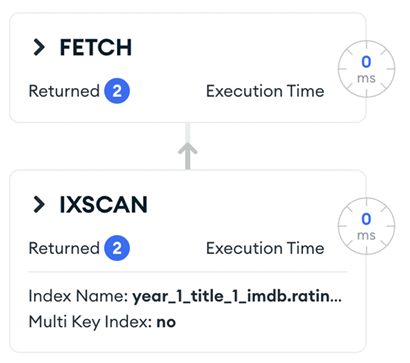
The Compass explain plan shows an `IXSCAN` using the year–title–rating index, followed by a `FETCH` for the matching documents. section 7.2.2


