A byte is one addressable memory location made from 8 bits. Each bit is either off (0) or on (1), so an 8-bit byte can hold a value from 0 to 255. Bits are numbered right to left, from 0 through 7. section 3.2 section 4.5
Bytes hold many kinds of game data. A memory location can store a ship position, score, or music state; bytes can also describe sprite coordinates, tile pixels, or separate on/off flags. section 3.2 section 4.5
An 8-bit value can be written in several useful forms:
- Decimal uses ordinary numbers, such as 85. section 3.2.1
- Binary shows the individual bits with a % prefix, such as %10101010, which equals 170. section 3.2.1
- Hexadecimal compresses four bits into one digit with a $ prefix. Two hexadecimal digits represent one byte, so $AF equals 175. section 3.2.1
- A nibble is half a byte: bits 0–3 or bits 4–7. It stores a value from 0 to 15, written 0 through F in hexadecimal. section 4.5
Reading a binary byte
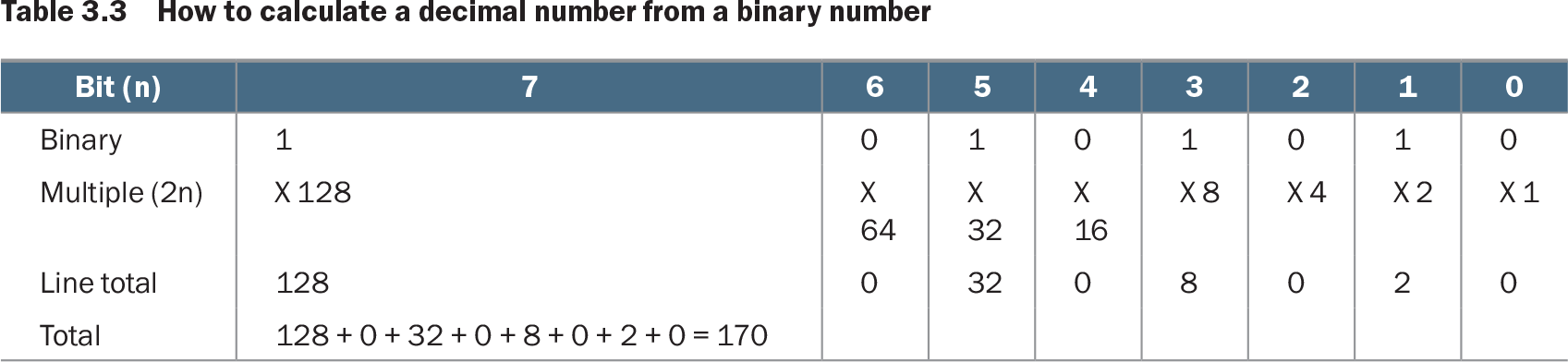
The byte %10101010 has bits 7, 5, 3, and 1 turned on. Their values are 128, 32, 8, and 2; adding them gives 170. The same byte can be written as decimal 170 or hexadecimal $AA. section 3.2.1
Table 3.3 How to calculate a decimal number from a binary number (view table figure)
| Bit (n) |
7 |
6 |
5 |
4 |
3 |
2 |
1 |
0 |
|---|---|---|---|---|---|---|---|---|
| Binary |
1 |
0 |
1 |
0 |
1 |
0 |
1 |
0 |
| Multiple (2n) |
X 128 |
X 64 |
X 32 |
X 16 |
X 8 |
X 4 |
X 2 |
X 1 |
| Line total |
128 |
0 |
32 |
0 |
8 |
0 |
2 |
0 |
| Total |
128 + 0 + 32 + 0 + 8 + 0 + 2 + 0 = 170 |
Use the bit-value table to see how each on bit contributes a power of 2 to a byte's decimal value. section 3.2.1
Registers and RAM both work with stored values, but registers are a small, fast set of locations inside the 6502 for calculations. NES RAM provides 2,048 bytes for readable and writable game data, while cartridge ROM holds code and graphical patterns that the CPU can read but not change. section 3.2