The MVC and Razor Pages filter pipeline runs inside ASP.NET Core request processing, after routing has selected an action or page. It provides hooks for shared work—such as authorization, validation handling, and response customization—without repeating that work in every action or page handler. A filter can also return a result early, preventing some later work from running. section 21.0 section 21.1
Each filter type has a particular place and purpose:
- Authorization filters run first. They can reject a request before model binding or an action runs; use ASP.NET Core’s built-in authorization framework to protect endpoints. section 21.1 section 22.1.1
- Resource filters run before model binding and can run again after later processing. They suit early decisions, such as rejecting an unsupported request format. section 22.1.2
- Action filters surround MVC action execution after model binding. Razor Pages use page filters instead: they run after handler selection, after model binding, and after the handler executes. section 21.2 section 22.4
- Exception filters can handle exceptions from actions or page handlers. Result filters wrap execution of an IActionResult, allowing its output to be customized. section 22.2 section 22.4
Figure 21.2 The MVC filter pipeline, including the five filter stages. Some filter stages (resource, action, and result) run twice, before and after the remainder of the pipeline.
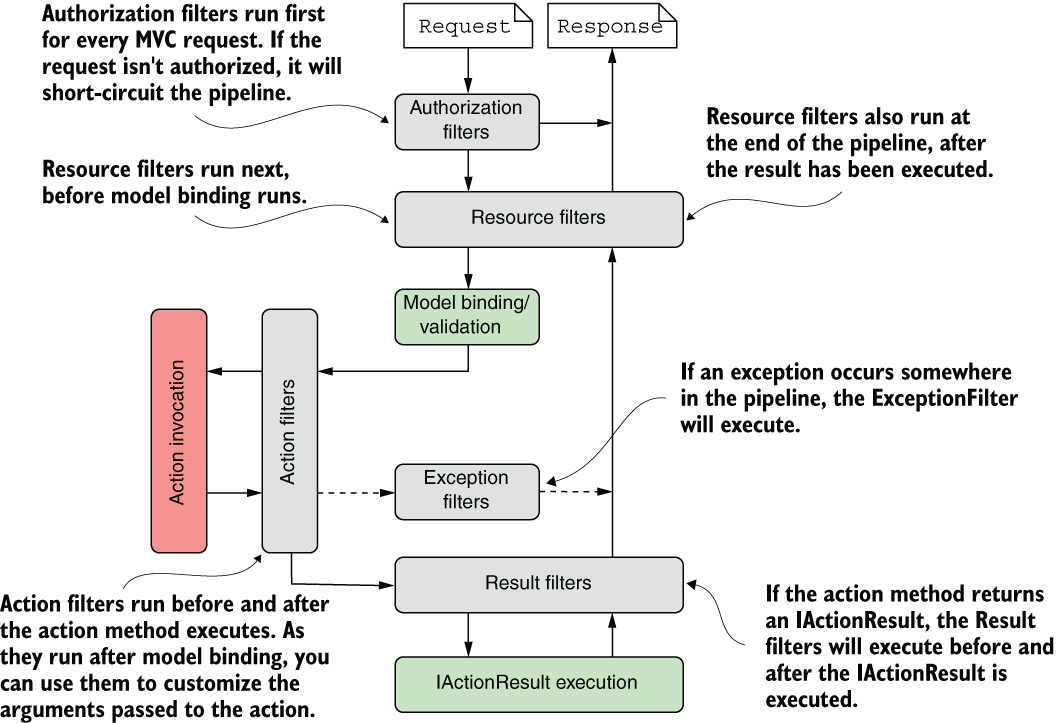
The diagram shows why the pipeline is not simply a straight line: resource, action, and result filter stages have work on both the way in and the way out. section 21.1
Razor Pages share the authorization, resource, exception, and result filters used by MVC. The page filter is the important difference. Its first hook follows handler selection, before model binding and validation; its later hooks can inspect bound data or adjust the handler’s result. section 21.2
Figure 21.3 The Razor Pages filter pipeline, including the five filter stages. Authorization, resource, exception, and result filters execute in exactly the same way as for the MVC pipeline. Page filters are specific to Razor Pages and execute in three places: after page hander selection, after model binding and validation, and after page handler execution.
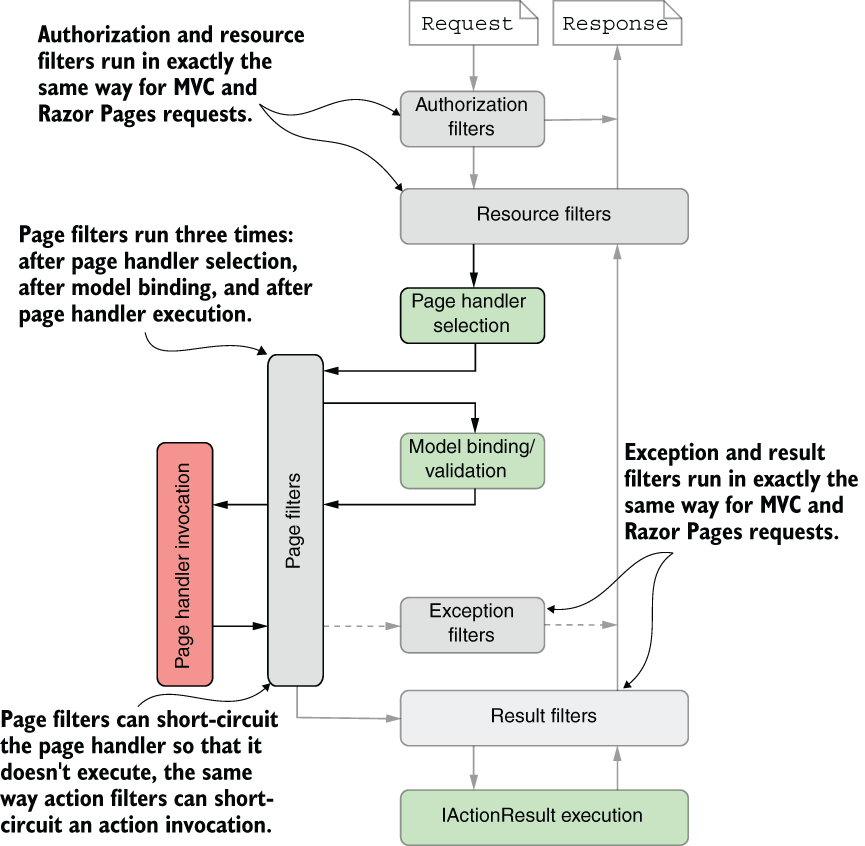
The Razor Pages diagram locates all three page-filter hooks among the shared filter stages. section 21.2
Choose a filter when behavior belongs to particular MVC actions or Razor Pages, or needs MVC features such as ModelState and IActionResult. Choose middleware for behavior that may need to run across requests more generally; filters run only when a controller action or Razor Page handler executes. section 21.3
Stop a disabled feature before model binding
A resource filter implementing IResourceFilter can check whether a feature is enabled in OnResourceExecuting. If not, setting context.Result to a BadRequestResult stops the request before model binding and the action. Applied to a controller, the filter keeps that check out of individual action methods. section 22.1.2
Filters in a stage normally enter from broader to narrower scope—global, controller, then action for MVC—and leave in reverse order. Razor Pages use global and page scopes. For more control, implement IOrderedFilter: lower Order values run first, with scope breaking ties. Short-circuiting depends on the stage: an action filter’s result still goes through result filters, whereas a result returned early by an authorization or resource filter normally does not. section 21.6.1 section 21.6.2 section 22.2
