liveBook · Manning

React

As explained in React Hooks in Action: With Suspense and Concurrent Mode

React is a JavaScript library for building user interfaces from declarative, composable components.

React is a JavaScript library for building user interfaces from reusable, composable components. Components turn changing data and user interactions into understandable interface descriptions. section 1.0 section 1.1

React’s core approach combines:

  • Reusable components that can be nested into complex interfaces. section 1.1
  • JSX, an HTML-like syntax that is compiled into JavaScript. section 1.1.1
  • State and props that describe the latest data and UI requirements. section 1.1.2
  • Scheduled DOM updates that keep the displayed interface synchronized with state. section 1.1.2

Quiz app with reusable toggles

A quiz can reuse one TextToggle component for both a question and its answer, passing title, text, and visibility as props: <TextToggle title="Question" text="Who created JavaScript?" show={true} />. A state change can hide or reveal the answer, causing the interface to re-render. section 1.1.1 section 1.1.2

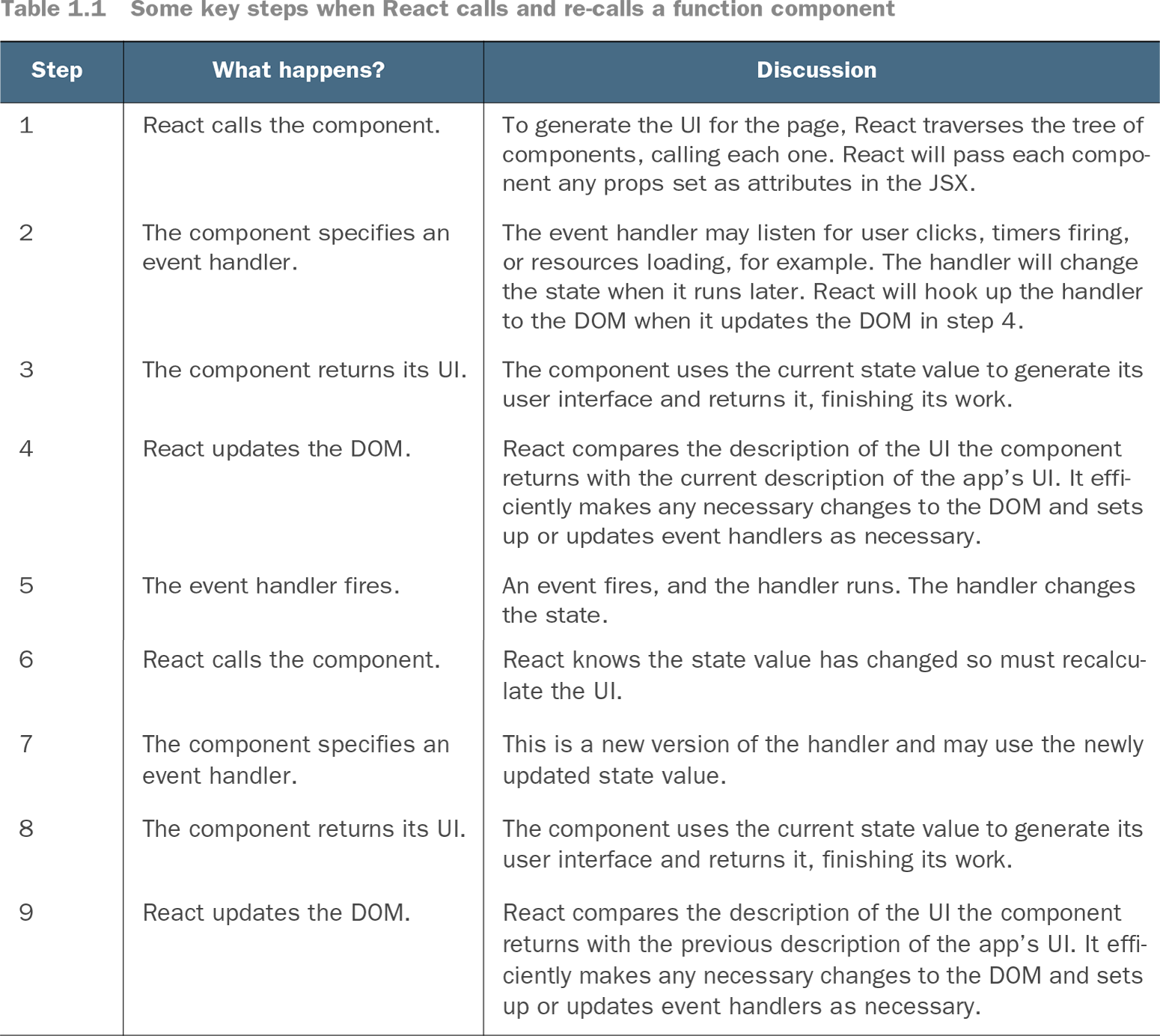
Table 1.1 Some key steps when React calls and re-calls a function component (view table figure)

Step

What happens?

Discussion

1

React calls the component.

To generate the UI for the page, React traverses the tree of components, calling each one. React will pass each component any props set as attributes in the JSX.

2

The component specifies an event handler.

The event handler may listen for user clicks, timers firing, or resources loading, for example. The handler will change the state when it runs later. React will hook up the handler to the DOM when it updates the DOM in step 4.

3

The component returns its UI.

The component uses the current state value to generate its user interface and returns it, finishing its work.

4

React updates the DOM.

React compares the description of the UI the component returns with the current description of the app’s UI. It efficiently makes any necessary changes to the DOM and sets up or updates event handlers as necessary.

5

The event handler fires.

An event fires, and the handler runs. The handler changes the state.

6

React calls the component.

React knows the state value has changed so must recalculate the UI.

7

The component specifies an event handler.

This is a new version of the handler and may use the newly updated state value.

8

The component returns its UI.

The component uses the current state value to generate its user interface and returns it, finishing its work.

9

React updates the DOM.

React compares the description of the UI the component returns with the previous description of the app’s UI. It efficiently makes any necessary changes to the DOM and sets up or updates event handlers as necessary.

Trace the function-component cycle: React calls the component, it specifies handlers and returns UI, and React updates the DOM. section 1.1.2


How React Hooks in Action: With Suspense and Concurrent Mode covers it

How deep it goes
Explains components, JSX, state, props, rendering, and DOM updates at a high level while deferring detailed JSX and hook behavior.
Examples
Uses a quiz app, TextToggle components, question-and-answer cards, cycle diagrams, and rendering-step tables.
What it assumes
Assumes JavaScript familiarity while teaching React’s component, JSX, props, state, and rendering model at an introductory level.
What you can do after
Builds reusable interactive UI components and understands how state changes produce updated displays.
How it connects
Connects components with JSX, JavaScript, props, state, event handlers, Babel, and the DOM.

Also explained in

Compare how 5 books explain React →

Related concepts

This explainer was generated by Manning's knowledge graph from the text of React Hooks in Action: With Suspense and Concurrent Mode. The section links point to the parts of the book it draws on.