A container can start running before its application is ready to answer requests. Without a readiness check, Kubernetes assumes it can receive traffic immediately. A readiness check gives the application a way to say “not yet,” preventing requests from reaching it during startup. section 4.1.1
A readiness check is a test performed by a Kubernetes readiness probe. The probe asks the container for its status; a successful response means it can receive traffic. A timeout or failed response means it is unready. Kubernetes keeps an unready Pod out of its Service’s traffic rotation and adds it back when the check passes. The Pod can remain running throughout. section 4.1 section 4.1.1
Readiness and liveness answer different questions. Readiness asks whether the container can serve traffic; liveness asks whether it is running and needs restarting. A missing database connection might make an otherwise functioning container unready. Restarting it immediately could prevent it from reconnecting, so readiness checks commonly test critical dependencies while liveness checks do not. section 4.1.1 section 4.1.4
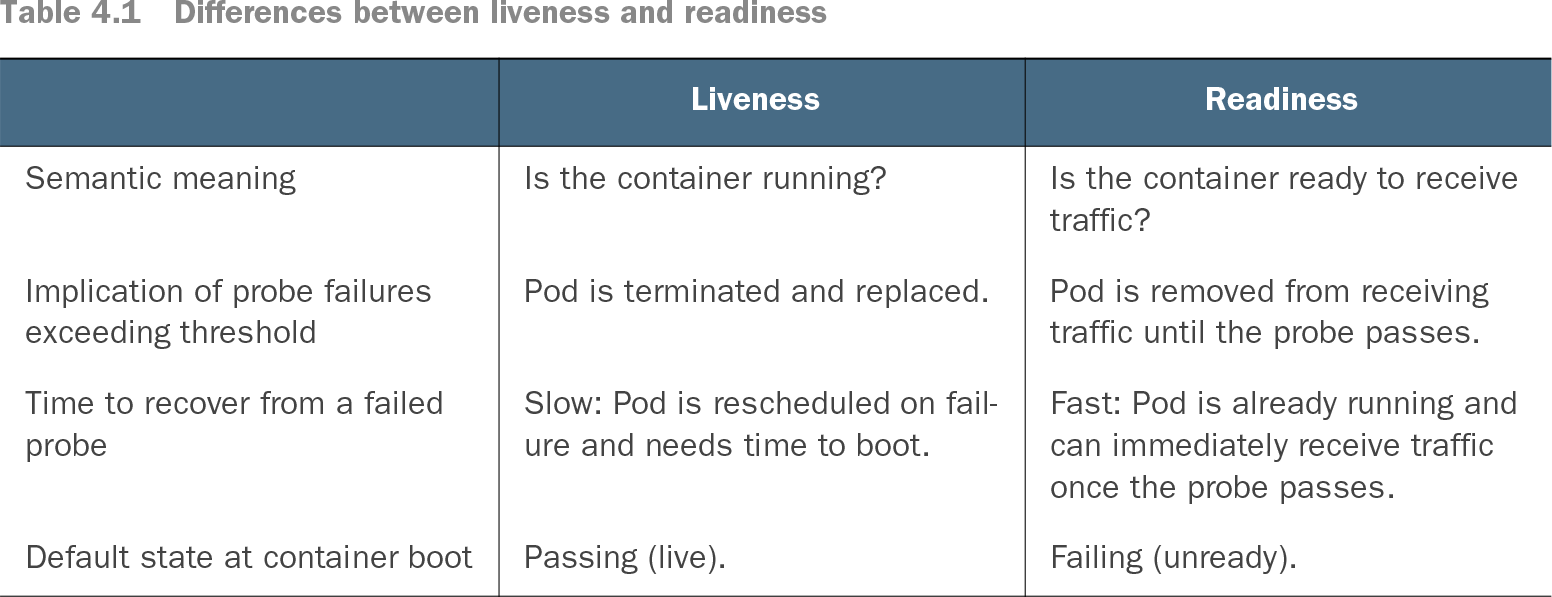
Table 4.1 Differences between liveness and readiness (view table figure)
| Pod is removed from receiving traffic until the probe passes. |
||
| Fast: Pod is already running and can immediately receive traffic once the probe passes. |
||
Compare what each probe means, what happens after failure, and its state when a container starts. section 4.1.1
Keep an unready replica out of service
Suppose a Service has three replicas and one stops responding to its readiness probe. Kubernetes routes Service traffic to the other two. When the failing replica responds successfully again, it returns to the rotation. The same check prevents a newly created replica from receiving traffic before it finishes starting during an update. section 4.1.2
For a simple web service, an existing path that reliably returns HTTP 200 can serve as a first check. A dedicated endpoint such as /readyz is preferable when readiness needs its own logic. For example, it can test a database connection with a small query and return HTTP 200 when the dependency responds or HTTP 503 when it does not. section 4.1.2 section 4.1.4
Listing 4.1 Chapter04/4.1.2_Readiness/deploy.yaml
apiVersion: apps/v1
kind: Deployment
metadata:
  name: timeserver
spec:
  replicas: 3
  selector:
    matchLabels:
      pod: timeserver-pod
  template:
    metadata:
      labels:
        pod: timeserver-pod
    spec:
      containers:
      - name: timeserver-container
        image: docker.io/wdenniss/timeserver:1
        readinessProbe:
          initialDelaySeconds: 15  #1
          periodSeconds: 30        #2
          httpGet:                 #3
            path: /                #3
            port: 80               #3
            scheme: HTTP           #3
          timeoutSeconds: 2        #4
          failureThreshold: 1      #5
          successThreshold: 1      #6
#1 After an initial delay
#2 Every 30 seconds
#3 Perform this HTTP request.
#4 Time out after 2 seconds.
#5 Consider one error response to indicate the container is not ready.
#6 Consider one successful response to indicate the container is ready after being considered unready.
A Deployment example configures an HTTP readiness probe with a path, port, initial delay, check interval, timeout, and success and failure thresholds. section 4.1.2
Readiness matters most when Pods are created or replaced. It helps a RollingUpdate avoid sending requests to a version that has not finished booting. If a Pod remains unready indefinitely because its retry logic is stuck, a separate liveness rule can eventually restart it—but it should allow time for the dependency to recover first. section 4.2.4 section 4.1.5