A redundancy management interface is a logical WLC interface for connecting to and managing the standby controller in a redundant pair. The pair uses redundancy ports, with one WLC active and the other standby. section 21.2.1 section 21.4
Distinguish this interface from related WLC interfaces:
- Management interface: provides default in-band management through the distribution-system ports. section 21.2.1
- AP-manager interface: carries WLC-to-lightweight-AP CAPWAP communication; by default, the management interface also serves this role. section 21.2.1
- Service-port interface: supports out-of-band management through the physical service port. section 21.2.1
Redundant controller pair
Connect two WLCs through their redundancy ports. The active controller handles normal operation, while the redundancy management interface provides access to the standby controller. section 21.4
Figure 21.9 WLC ports and interfaces. Ports are physical connectors that connect to other devices, and interfaces are logical entities in the WLC.
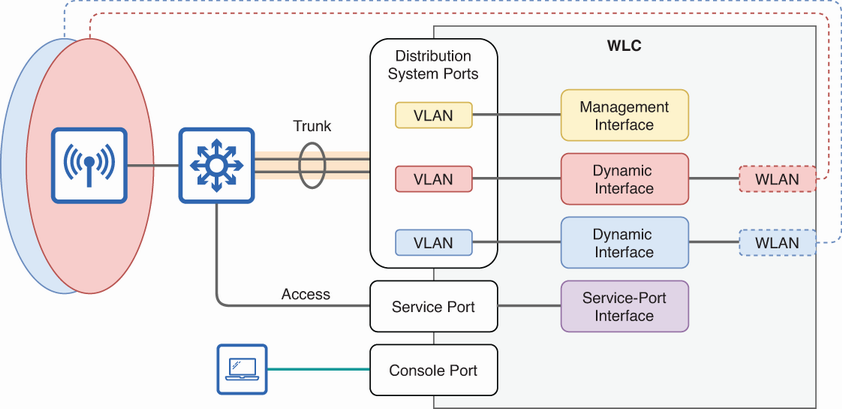
Use the figure to distinguish physical WLC ports from logical interfaces, including the redundancy management interface. section 21.2.1
