When a BookablesList user changes groups, selects a bookable, toggles details, or moves to the next item, the component dispatches an action instead of updating each state value separately. section 3.2.2 section 3.2.3
An action is information that a reducer uses to update state. For anything beyond the simplest actions, represent it as a JavaScript object with a type property and, when needed, a payload property. The type identifies the requested change; the payload supplies its extra value. section 3.2.1 section 3.4
Use action types to describe state changes clearly:
- Dispatch { type: "SET_GROUP", payload: "Rooms" } to select a group and reset its bookable index to zero. section 3.2.2
- Dispatch { type: "SET_BOOKABLE", payload: 1 } to select a particular bookable. section 3.4
- Dispatch { type: "TOGGLE_HAS_DETAILS" } when no extra value is required; the reducer toggles the existing boolean. section 3.2.3
- Use payloads for variable operations such as adding, subtracting, or setting a counter value. section 3.2.1
Dispatching an action from a control
const [state, dispatch] = useReducer(reducer, initialState);\n\n<input\n type="checkbox"\n checked={state.hasDetails}\n onChange={() => dispatch({ type: "TOGGLE_HAS_DETAILS" })}\n/>\n\nThe dispatch function sends the action to the reducer, which receives the current state and returns the next state; React then calls the component again with the latest state. section 3.2.3
Figure 3.4 Pass the reducer a state object and an action object. The reducer updates the state based on the action type and payload. The reducer returns the new, updated state.
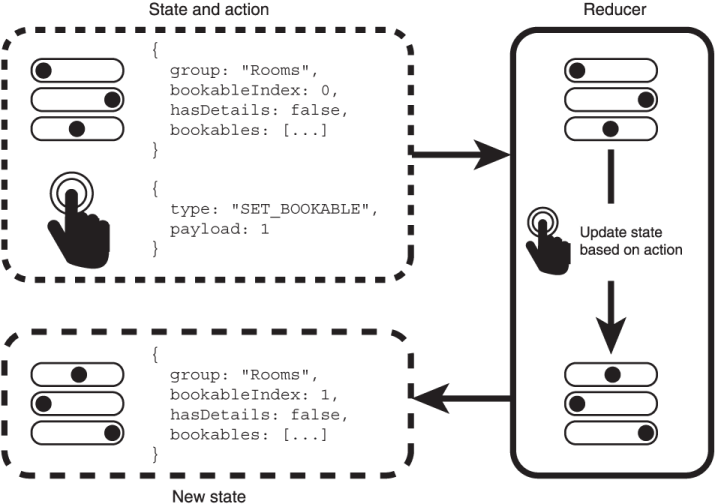
Trace how an action object supplies its type and payload to a reducer, which returns updated state. section 3.2.2

