A React ref gives code access to a rendered element so another tool, such as D3, can control that element directly. With useRef(), attach the ref to an element, then read its current property after rendering. section 8.5.1
Use a ref to connect React-rendered markup with D3:
- Import useRef and useEffect from React, then initialize a ref such as scatterplotRef = useRef(). section 8.5.1
- Attach the ref to the element D3 should control, for example <g ref={scatterplotRef}></g>. section 8.5.1
- Inside useEffect, select the current rendered element with d3.select(scatterplotRef.current). section 8.5.1
- Keep D3 operations inside the effect so they work with the up-to-date rendered element. section 8.5.1
Animating a curve path
A hybrid chart can let React render a path while a ref lets D3 animate its d attribute. The effect selects pathRef.current, applies a transition, and reruns when the data or line generator changes. section 8.7
Figure 8.5 To let D3 control a portion of the DOM in React, we first need to import the useRef() and the useEffect() hooks into our component. We then initialize a ref and attach it as an attribute to the element we want to control with D3. Finally, inside a useEffect() hook, we select the current instance of the ref and start using D3 as usual.
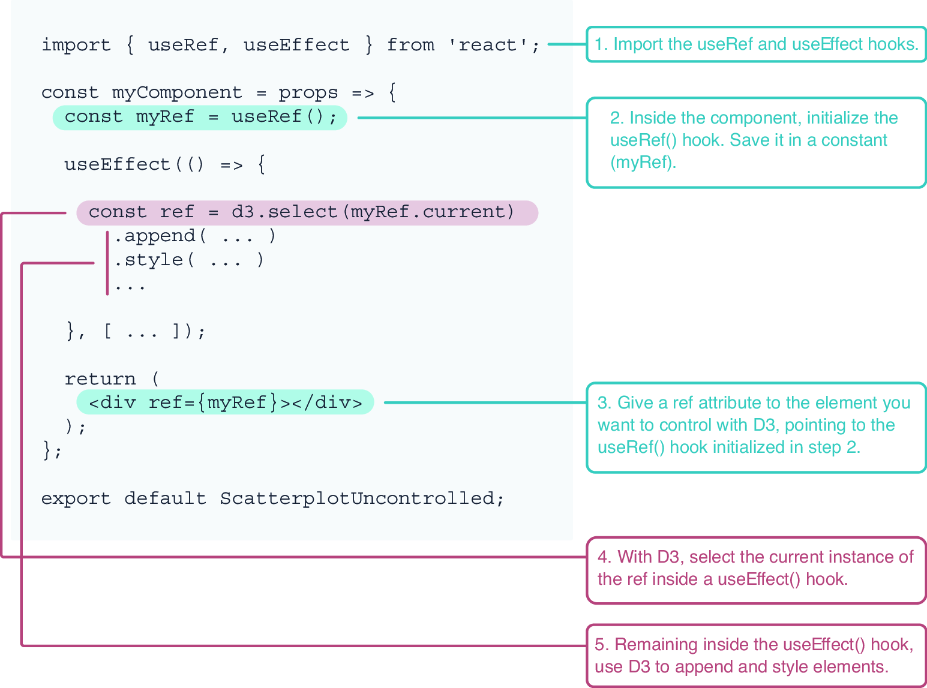
The diagram shows the complete handoff: initialize useRef, attach the ref, select its current element inside useEffect, and continue with D3. section 8.5.1


