liveBook · Manning

Registry key

As explained in Practical Automation with PowerShell: Effective scripting from the console to the cloud

A registry key is a named hierarchical container in the Windows Registry that stores configuration values and subordinate keys.

A registry key is a named hierarchical container in the Windows Registry that stores configuration values and subordinate keys. In server automation, registry keys provide the settings checked and updated when applying a security baseline. section 6.0 section 6.2

Represent each registry check as external, human-readable data containing:

  • KeyPath, such as HKLM:\SYSTEM\CurrentControlSet\Services\LanManServer\Parameters\. section 6.2.1
  • Name, identifying the registry value to inspect. section 6.2.1
  • Expected values and comparison operators, including equals, greater than or equal to, between, and null-or-equal conditions. section 6.2.1
  • A nested Tests array when one registry value can satisfy multiple alternatives. section 6.2.1

Security-baseline registry checks

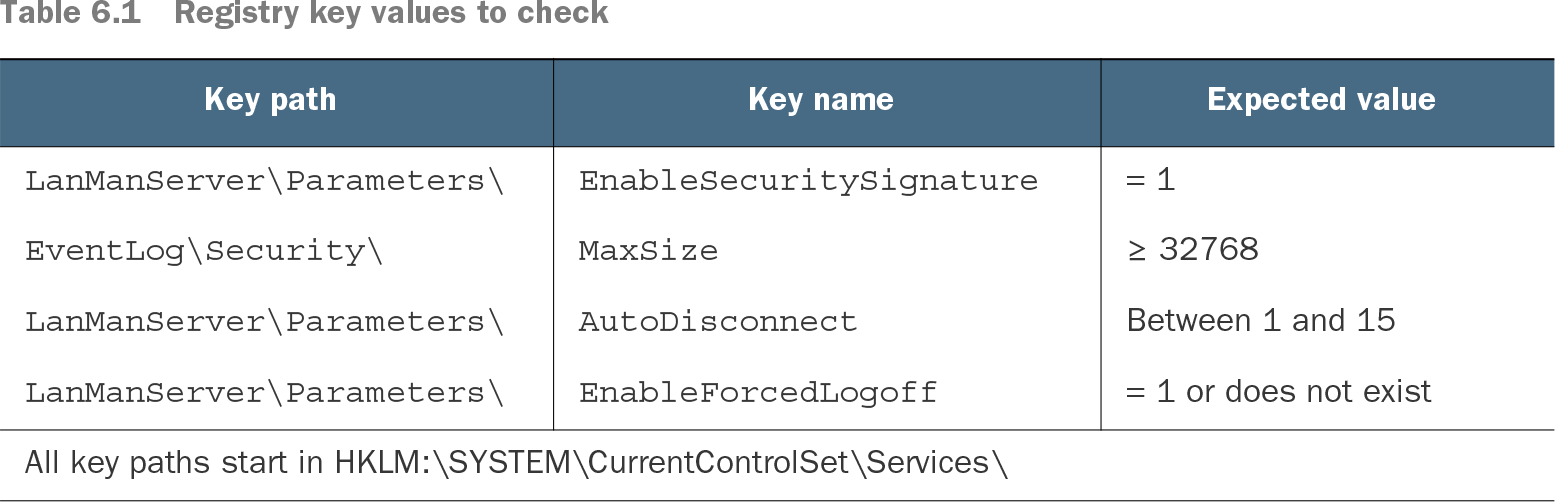
A baseline can require EnableSecuritySignature to equal 1, MaxSize to be at least 32768, AutoDisconnect to fall between 1 and 15, or EnableForcedLogoff to equal 1 or not exist. Get-ItemProperty reads values, while New-ItemProperty changes or adds them. section 6.2

Table 6.1 Registry key values to check (view table figure)

Key path

Key name

Expected value

LanManServer\Parameters\

EnableSecuritySignature

= 1

EventLog\Security\

MaxSize

≥ 32768

LanManServer\Parameters\

AutoDisconnect

Between 1 and 15

LanManServer\Parameters\

EnableForcedLogoff

= 1 or does not exist

All key paths start in HKLM:\SYSTEM\CurrentControlSet\Services\

Browse the registry-path, value-name, expected-value, and condition structure used for baseline checks. section 6.2.1

How Practical Automation with PowerShell: Effective scripting from the console to the cloud covers it

How deep it goes
Explains paths, names, expected values, comparison operators, and nested tests, then connects them to PowerShell read and write cmdlets.
Examples
Uses Azure virtual-machine security recommendations and checks for EnableSecuritySignature, MaxSize, AutoDisconnect, and EnableForcedLogoff.
What it assumes
Assumes PowerShell and Windows Registry familiarity while teaching the registry-check data structure from its required fields.
What you can do after
Apply it via Get-ItemProperty and New-ItemProperty to evaluate and update registry values from reusable external data.
How it connects
Connects registry keys with PowerShell, functions, modules, external configuration data, and security baselines.

Related concepts

This explainer was generated by Manning's knowledge graph from the text of Practical Automation with PowerShell: Effective scripting from the console to the cloud. The section links point to the parts of the book it draws on.