The regulatory compliance dashboard in Microsoft Defender for Cloud continuously assesses Azure resource configurations against technical security controls in regulatory, industry, and benchmark standards. It maps applicable assessments to control requirements, showing a compliance posture that updates as resource configurations change. Use it to connect configuration findings and recommendations to the standards your organization must address. section 6.5 section 6.9
The dashboard evaluates technical controls, not every requirement of a standard. A grayed-out control can mean no assessment is mapped to it or that Defender for Cloud cannot automatically assess it, such as a procedure- or process-related control. section 6.5.1
To investigate a failing control against PCI DSS 3.2.1:
- Open Microsoft Defender for Cloud in the Azure portal, select Regulatory Compliance, and choose the PCI DSS 3.2.1 tab. section 6.5.1
- Expand a red failing control, select a recommendation with failed resources, and use Recommendation Details guidance to remediate the configuration. section 6.5.1
- Allow up to 12 hours for updated results to appear after changes. section 6.5.1
MCSB is the default standard when opening the dashboard. Other built-in standards may appear as tabs, while standards such as CMMC Level 3, NIST SP 800-53 Revision 5, or HIPAA/HITRUST can require adding before benchmarking resources against them. section 6.5.1 section 6.5.2
Add a built-in standard at an appropriate governance scope:
- With an Owner or Policy Contributor role, open Manage Compliance Policies and select the target subscription or management group. section 6.5.2
- Choose Security Policy, select Add More Standards under Industry & Regulatory Standards, add the standard, and complete the initiative-assignment wizard. section 6.5.2
- Prefer the highest applicable scope so compliance data is aggregated; allow a few hours for the standard to appear. section 6.5.2
Custom key vault expiry check
A custom policy definition can audit Azure Key Vault secrets without expiry dates. Its evaluation identifies noncompliant key vaults, and a custom policy initiative can be displayed in the dashboard alongside regulatory standards so security checks remain centrally visible. section 10.4
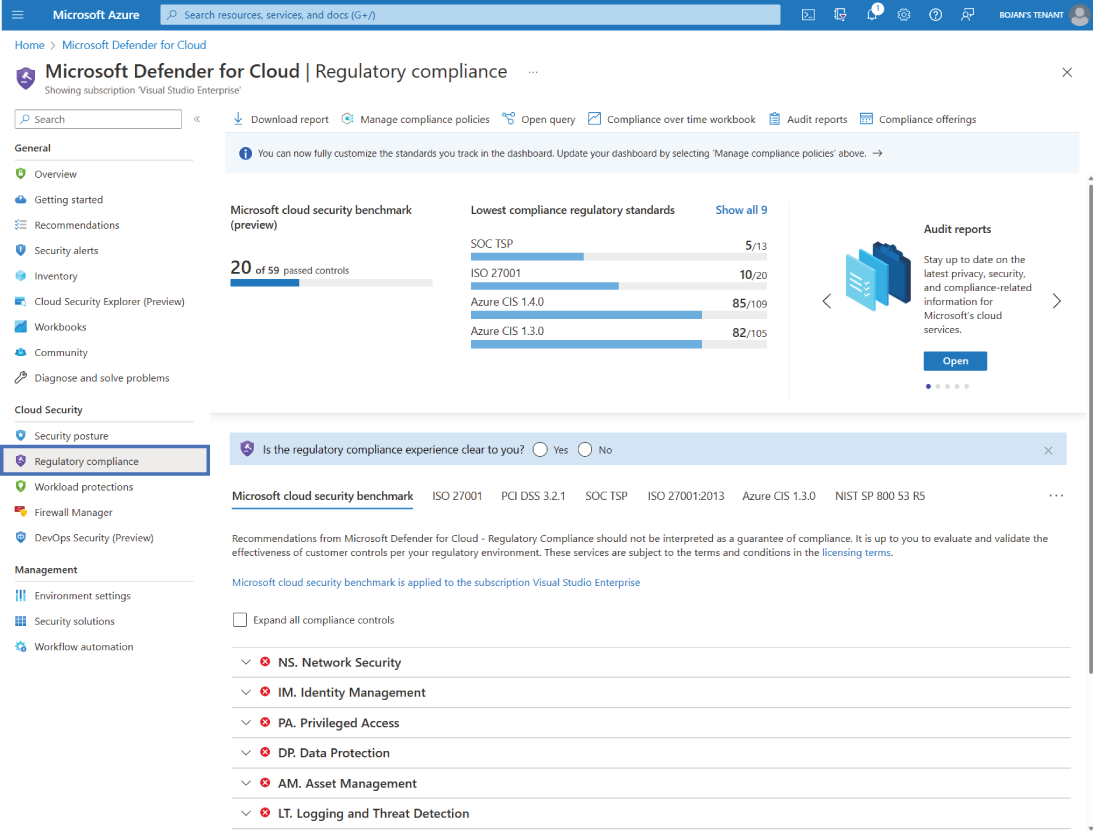
Use the dashboard view to orient yourself to standards, control status, and failing assessments before drilling into recommendations. section 6.5.1
