Relative luminance measures a color’s lightness relative to a reference white. It supplies the two values needed to calculate contrast between foreground and background colors. section 4.4.2
Use relative luminance to make visual elements easier to distinguish:
- Calculate contrast as (L1 + 0.05) / (L2 + 0.05), using the lighter and darker relative-luminance values. section 4.4.2
- Check small-scale color against its background at 4.5:1 for AA, or 7:1 for AAA. section 4.4.2
- Check large-scale color at 3:1 for AA, or 4.5:1 for AAA; borders can change which color is evaluated. section 4.4.2
Blue bars on light gray
Blue bars without borders reach only 1.93:1 against light gray. Adding a dark-gray border produces an 8.7:1 border-to-background contrast, passing the 3:1 AA threshold. section 4.4.2
Figure 4.34 On the left, the blue bars have no border, so the contrast is calculated between the blue and the light gray as 1.93:1, which is too low to pass WCAG’s AA level of 3:1. However, if you add a dark-gray border, the contrast is then calculated using the border against the background, which shows up better than just the plain blue bars. The contrast between the darker gray border and the lighter gray background is a whopping 8.7:1, beating out the AA level by almost a factor of two.
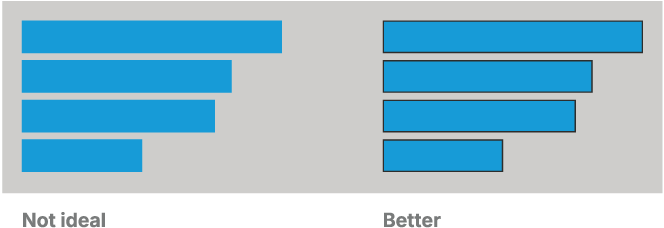
Compare how adding a border changes the evaluated contrast and improves the visual separation of data bars. section 4.4.2

