A deployment artifact is a tested software package or image ready for deployment. In a Dockerized workflow, a CI pipeline turns source code into Docker images containing the latest compiled, tested, and packaged application. section 11.1
Keeping deployment configuration and artifacts in source control makes releases reproducible: fetch a specific version and run the deployment scripts. The same practice also helps developers reproduce production problems locally. section 10.5
A practical artifact workflow includes:
- Build the application inside containers so the CI server does not require language runtimes or build SDKs. section 11.1
- Run automated unit tests during the image build; broken code fails the build and stops the CI job. section 11.1
- Run end-to-end tests with Docker Compose and publish successful images to a registry for distribution. section 11.1
One application, several environments
A development environment can use a local database file, while a test environment runs a database container and production connects to a cloud database. Compose override files preserve shared deployment artifacts while adapting each environment. section 10.5
Figure 11.1 The basic steps of a CI pipeline to build, test, and publish apps are all executed with Docker.
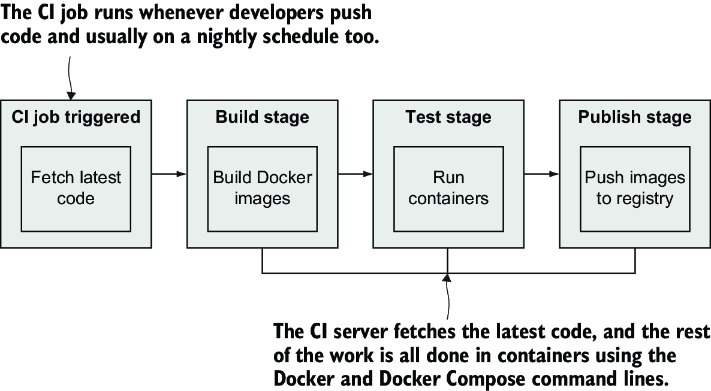
Use the pipeline diagram to follow how code becomes a tested Docker image and moves toward registry distribution. section 11.1

