Remediation corrects security problems found in Azure resources, especially misconfigurations and weaknesses identified by Microsoft Defender for Cloud. Recommendations pair a problem description with affected resources and steps intended to reduce risk and improve secure score. section 6.2.3 section 6.4
Use recommendations as a tracked remediation loop:
- Open Microsoft Defender for Cloud, select Recommendations, and prioritize a security control by its Potential Score Increase. section 6.2.3
- Choose a recommendation with unhealthy resources, review its problem description and affected resources, then expand Remediation Steps. section 6.2.3
- Implement the listed steps and check again after the recommendation’s Freshness Interval to confirm that the finding has updated and the problem is fixed. section 6.2.3
- Assign an owner and due date through security governance; optionally use a grace period and email notifications to track on-time and overdue work. section 6.4
Remediation is also an organizational process. Resource owners commonly perform the work because they own the affected Azure resources, while security governance makes responsibility, deadlines, and progress visible. Attack paths can help identify which security problems deserve attention first because attackers may exploit them to compromise the environment. section 6.4 section 6.9
Vulnerability assessment finding on a VM
A recommendation can report that machines should have a vulnerability assessment solution installed. Open the unhealthy recommendation, follow its Remediation Steps, then wait for its refresh interval and verify that the VM no longer has the reported security problem. section 6.2.3
Figure 6.5 The recommendation Machines Should Have a Vulnerability Assessment Solution shown by Defender for Cloud for VMs
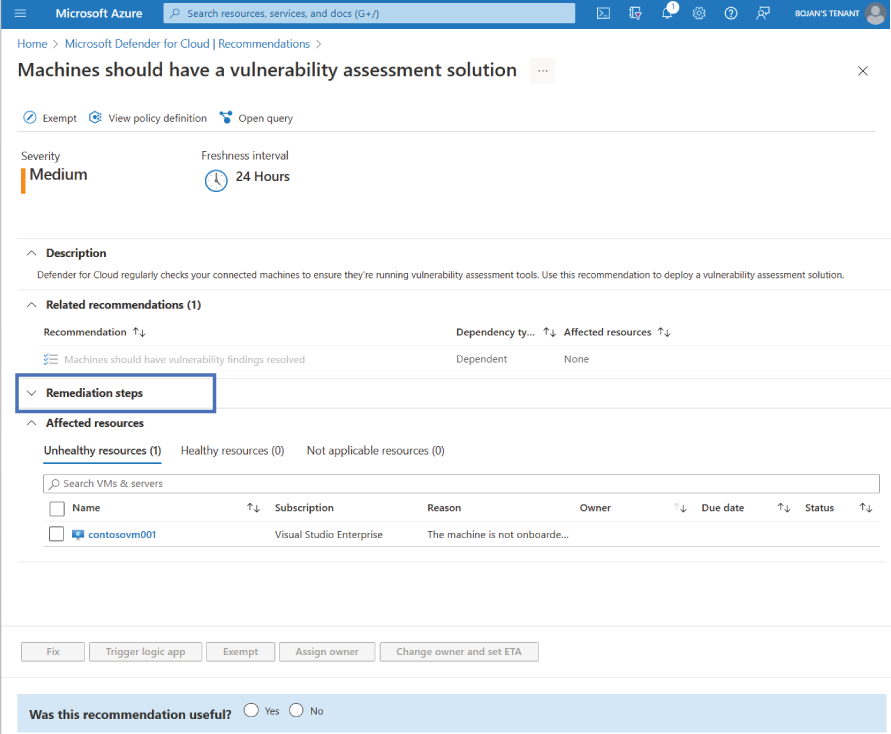
Use the recommendation view to recognize how a VM finding presents the affected issue and its remediation guidance. section 6.2.3
