A request-scoped bean is a Spring-managed object with a new instance for each HTTP request. That instance is available only during the request that created it, even when another request comes from the same client. section 9.1
Request scope is useful when data should live only long enough to handle one request.
- Spring creates a separate instance for every request; instances are short-lived and can be garbage-collected when their requests end. section 9.5
- Avoid costly work in the bean’s constructor or @PostConstruct method, since Spring creates the bean frequently. section 9.5
- Unlike a session-scoped bean, a request-scoped bean does not share its instance across multiple requests from the same client. section 9.0
Keep login credentials within one request
A LoginProcessor can hold a username and password, check them in its login() method, and be annotated with @Component and @RequestScope. The controller sets the credentials from the submitted form, calls login(), and displays a result. This example demonstrates request scope; production authentication should use Spring Security instead. section 9.1
Figure 9.2 For every HTTP request, Spring provides a new instance for the request-scoped bean. When using a request-scoped bean, you can be sure the data you add on the bean is available only on the HTTP request that created the bean. Spring manages the bean type (the plant) and uses it to get instances (coffee beans) for each new request.
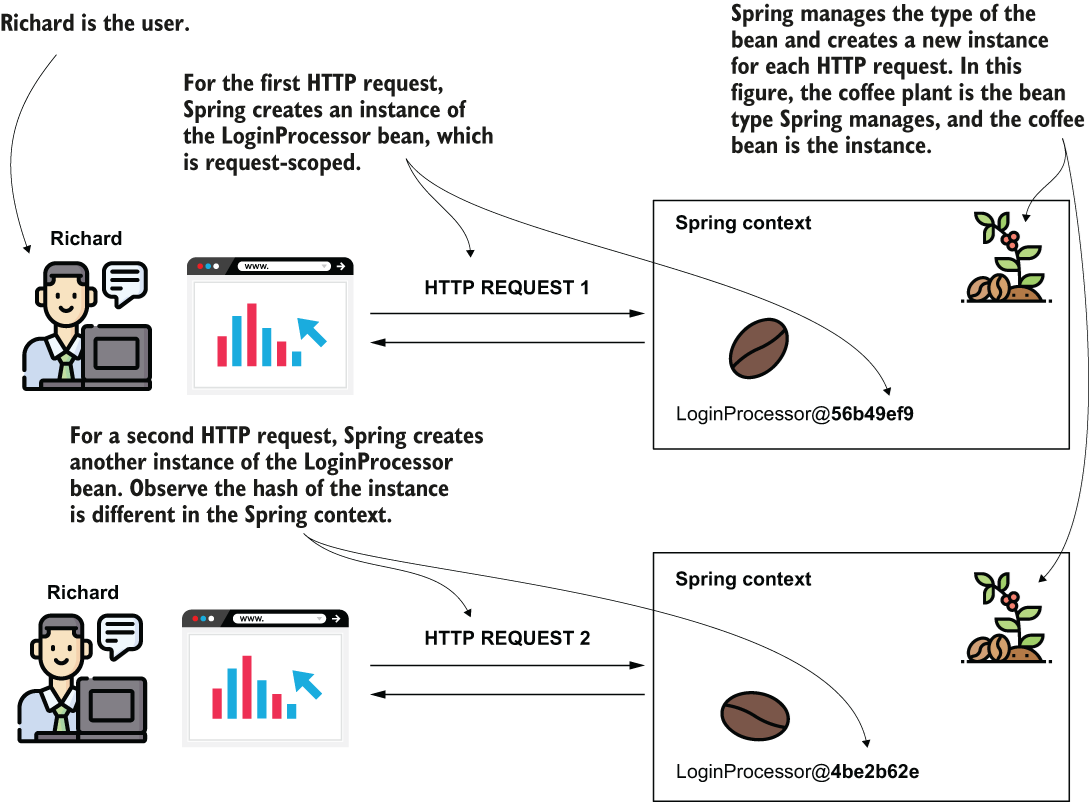
Use the figure’s plant-and-coffee-beans analogy to picture Spring creating a distinct bean instance for each request. section 9.1

