A restore chain is the ordered sequence of backup files required to recover a database to a desired state or point in time. A typical chain starts with a full backup, adds the appropriate differential backup, and then replays transaction log backups. section 12.12 section 12.1
Avoid these restore-chain mistakes:
- Do not choose backups only by their timestamps. A differential depends on its differential base, while transaction log backups must continue from the preceding log backup. section 12.1 section 12.10
- Do not discard an ordinary ad hoc full backup after a change. It may become the base for later differential backups and make those differentials unusable. section 12.10
- Use COPY_ONLY for ad hoc full backups so the normal differential base and restore sequence remain unchanged. section 12.10
The discarded 10 a.m. full backup
Suppose backups run at 1 a.m. for a full backup, at 6 a.m., noon, and 6 p.m. for differentials, and hourly for transaction logs. A 1:30 p.m. recovery normally restores the 1 a.m. full, the noon differential, and the 1 p.m. log. If a discarded 10 a.m. ordinary full became the differential base, restore the 1 a.m. full, the 6 a.m. differential, and the seven hourly logs from 7 a.m. through 1 p.m. For an ad hoc Marketing backup, use: BACKUP DATABASE Marketing TO DISK = 'D:\Backups\MarketingFullCopyOnly.bak' WITH COPY_ONLY; section 12.10
Figure 12.1 Restore chain
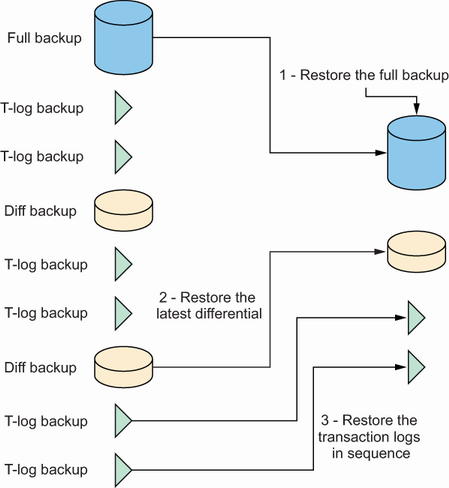
Use the restore-chain figure to inspect the dependency order among full, differential, and transaction log backups. section 12.1
