A reverse proxy receives requests from the internet and forwards them to the appropriate web server. In an ASP.NET Core deployment, it can sit in front of Kestrel: clients reach the proxy, while Kestrel is exposed only to the proxy. This is common, but not required—Kestrel can also receive internet requests directly. section 2.4.2 section 27.1
Figure 27.1 The hosting model for ASP.NET Core gives flexibility. The same application can run exposed directly to the network, behind various reverse proxies without modification, and even inside the IIS process.
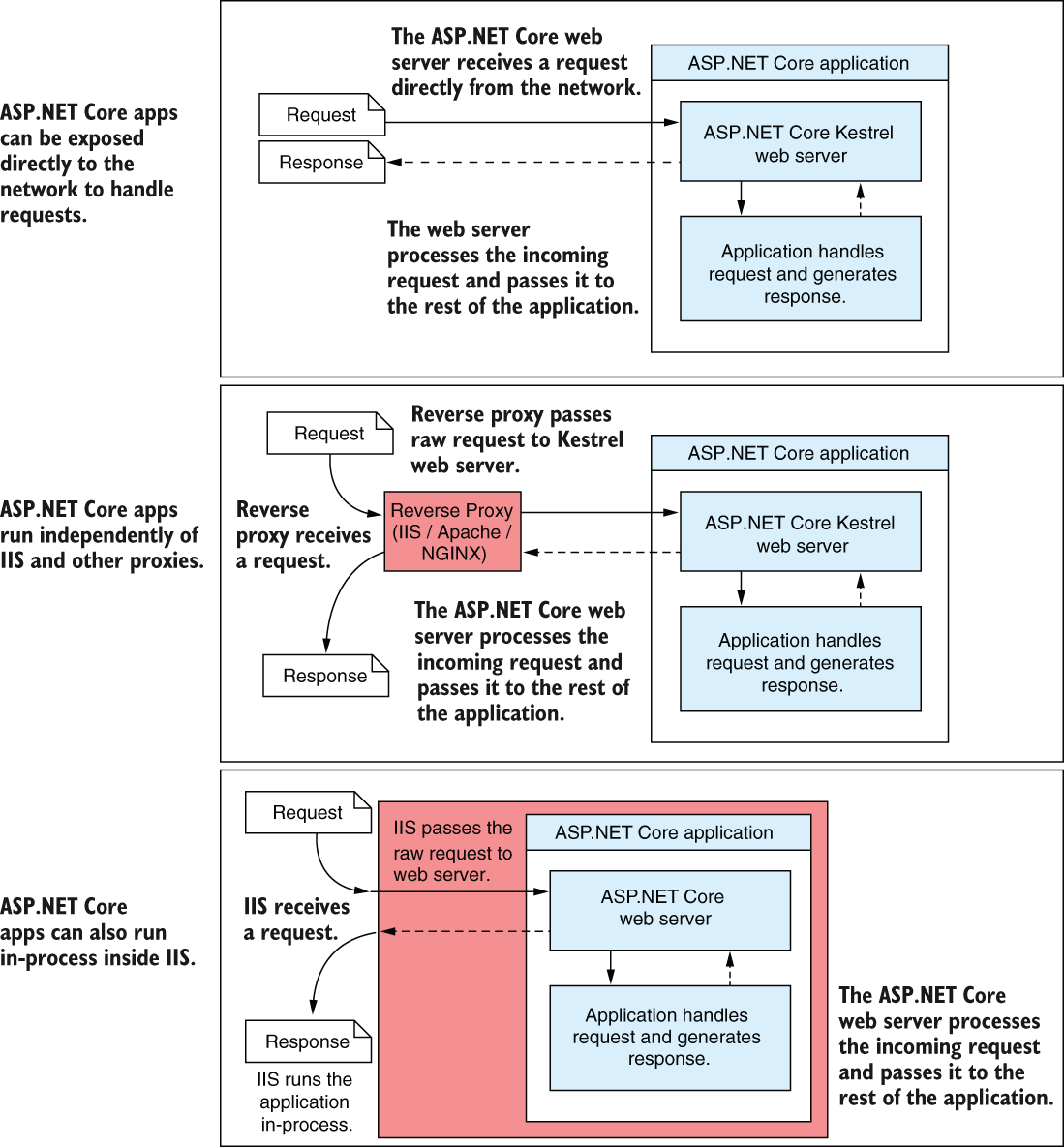
The hosting diagram shows the practical choice: the same application can run directly on the network or behind different reverse proxies without changing its application code. section 27.1
Put a proxy in front of an app when its extra responsibilities are useful:
- Security: a proxy designed for public traffic stands between the internet and the underlying web server. section 27.1
- Performance: a proxy can cache responses. section 27.1
- Process management: some proxies can monitor an app and respond when it crashes. section 27.1
A Windows or Linux deployment
On Windows, IIS commonly acts as the reverse proxy; a basic deployment involves publishing the app, setting up an IIS application pool and website, and copying the published files to its hosting folder. On Linux, NGINX or Apache can fill the proxy role. The app generally handles requests the same way regardless of which proxy sits in front of it. section 27.2 section 27.3.2
Forwarding can hide details of the original request. The app may see the proxy’s IP address instead of the client’s; if the proxy handles TLS, an original HTTPS request may arrive at the app as HTTP. A proxy can supply X-Forwarded-For and X-Forwarded-Proto headers so ForwardedHeadersMiddleware can update the request properties the app uses. section 27.3.2
Listing 27.1 Configuring an app to use forwarded headers in Startup.cs
WebApplicationBuilder builder = WebApplication.CreateBuilder(args);
WebApplication app = builder.Build();

app.UseForwardedHeaders(new ForwardedHeadersOptions         #1
{
    ForwardedHeaders = ForwardedHeaders.XForwardedFor |     #2
                       ForwardedHeaders.XForwardedProto     #2
});
app.UseHttpsRedirection();                                  #3
app.UseRouting();                                           #3
app.MapGet("/", () => "Hello world!");
app.Run();
The listing places UseForwardedHeaders before HTTPS redirection and configures it to read the forwarded client IP and protocol headers. section 27.3.2
For HTTPS, a proxy can pass encrypted traffic through to the app or terminate TLS itself. With TLS offloading, the browser-to-proxy connection uses HTTPS, but the proxy-to-app connection may be unencrypted. Account for that change when interpreting the request scheme. section 28.1 section 27.3.2




