liveBook · Manning

Rfind

As explained in Get Programming: Learn to code with Python

rfind is a Python string method that returns the highest index at which a specified substring begins or -1 when the substring is absent.

Use rfind() to search a string from the end. It returns the starting index of the matching substring nearest the end, or -1 when no match exists. section 8.1

Finding the last matching substring

who = "me myself and I"\nwho.rfind("el") # 6\n\nThe substring "el" occurs nearest the end beginning at index 6. By contrast, who.find("e") returns 1 because find() reports the first match. section 8.1

Quick checks with a = "python 4 ever&EVER":

  • a.rfind("rev") returns -1 because the substring is absent. section 8.1
  • a.rfind("VER") returns 15, while a.rfind(" ") returns 8. section 8.1
Figure 8.1. Four examples of substrings to find in the string "me myself and I". The arrows indicate the direction in which you’re finding the substring. The check mark tells you the index in which you found the substring. An x tells you that the substring wasn’t found.
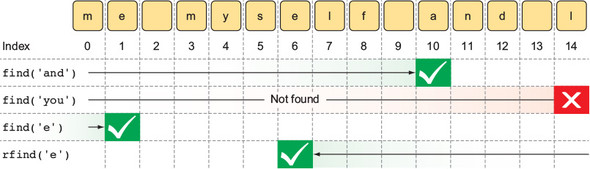
Use the figure to visualize search direction, matching indexes, and unsuccessful searches. section 8.1

How Get Programming: Learn to code with Python covers it

How deep it goes
Explains reverse search, zero-based starting indexes, absent matches, and contrasts rfind() with find().
Examples
Uses "me myself and I" and "python 4 ever&EVER" for worked examples and quick checks.
What it assumes
Uses string objects and zero-based indexes while defining substring search from basic examples.
What you can do after
Apply rfind() in Python to locate the last matching substring or detect its absence.
How it connects
Connects rfind() with strings, substrings, indexes, and find().

Related concepts

This explainer was generated by Manning's knowledge graph from the text of Get Programming: Learn to code with Python. The section links point to the parts of the book it draws on.