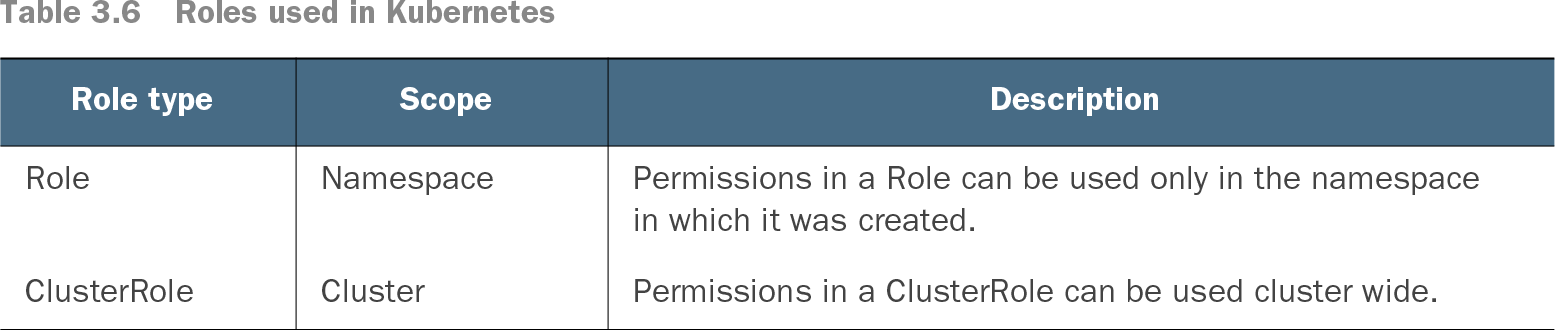
A Kubernetes Role defines permissions on one or more resources within a namespace. It must be created in a namespace, and its permissions can be assigned only there. Use a Role when access should not extend to other namespaces in a shared cluster. section 3.2.6
A Role defines the permission set; a binding assigns permissions to a user or service. A RoleBinding is namespace-scoped. By contrast, a ClusterRole can be used cluster-wide or assigned within a namespace, while a ClusterRoleBinding assigns permissions cluster-wide. Check both the permission resource and the binding before granting access. section 3.2.6
Console access to an attached cluster
Token login to an attached cluster requires a Kubernetes Service Account with suitable RBAC permissions. The example binds the account to `view` and `cloud-console-reader` using ClusterRoleBindings—not to a namespace-scoped Role. The former provides read-only access to most objects in a namespace but excludes roles and role bindings; the latter permits viewing nodes, persistent volumes, and storage classes in the console. section 2.7
Table 3.6 Roles used in Kubernetes (view table figure)
| Permissions in a Role can be used only in the namespace in which it was created. |
||
Compare where Role and ClusterRole permissions can be used. section 3.2.6