A rolling update replaces application instances gradually instead of stopping every old instance at once. Kubernetes creates new Pods, waits for them to become available, and then removes matching old Pods, keeping the application available during the transition. section 3.2.7 section 4.2.1
Control the rollout by balancing availability, speed, and temporary resource use:
- Set maxSurge to limit additional Pods created during the update; higher values can finish faster but consume more temporary capacity. section 4.2.1
- Set maxUnavailable to limit how many Pods may be unavailable while old instances are replaced. section 4.2.1
- Use readiness checks so traffic reaches only Pods that have finished starting; otherwise, an update can send requests to an unready container. section 4.2.4
- Expect old and new versions to serve traffic simultaneously, so dependencies and data formats must support coexistence. section 4.2.1
- Monitor READY and UP-TO-DATE counts, or stream changes with kubectl get deploy -w and kubectl get pods -w. section 3.2.7
Updating a three-Pod Deployment
Change the Deployment image from version 1 to version 2 and apply the manifest. Kubernetes can temporarily create replacement Pods, wait for availability, and remove old Pods until READY equals UP-TO-DATE. A manifest can configure type: RollingUpdate with maxSurge: 2 and maxUnavailable: 1. section 3.2.7
Figure 4.2 Pod status during a rolling update. With this strategy, requests can be served by either the old or the new version of the app until the rollout is complete.
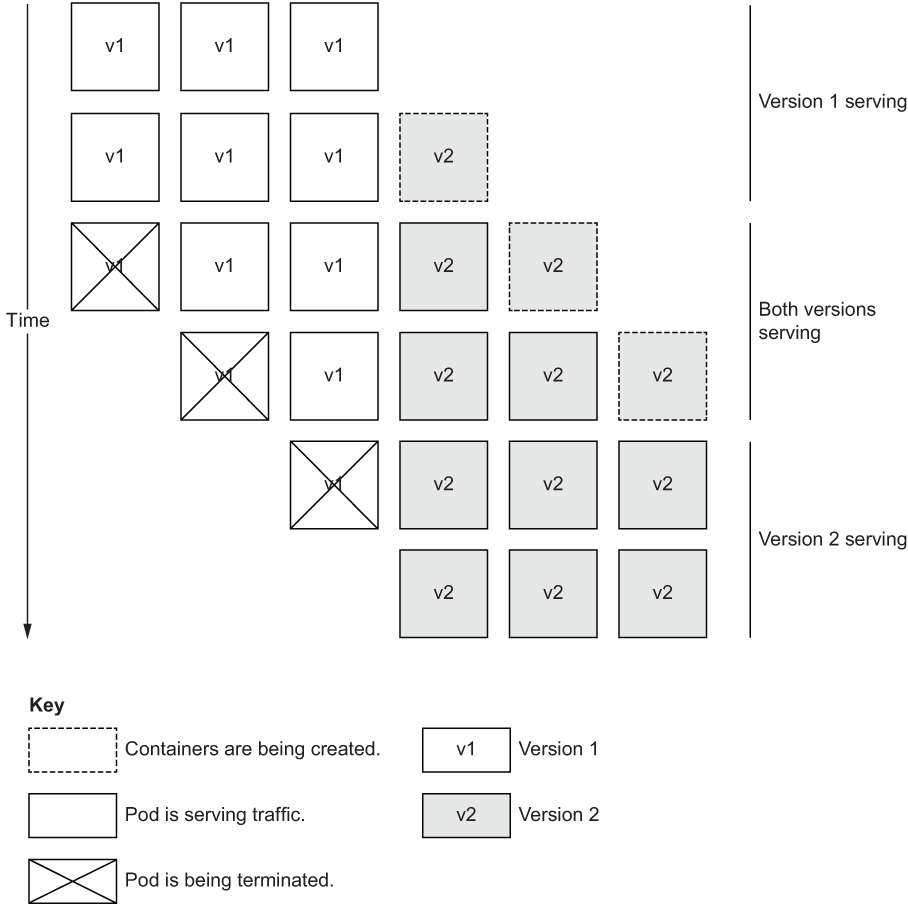
Visualizes how requests may reach either the old or new application version while the rollout is in progress. section 4.2.1







